
Services
Monthly bookkeeping run entirely in Xero — closed, reviewed and proven every period by the team that does the work.
Bookkeeping packages

Month-end close in Xero
Xero lets you lock a financial period once it is closed, so the numbers you reported stay the numbers you see. That is what makes management reporting something you can act on rather than something you have to re-check. This is every Xero feature built for month-end close, the order to run them in, and what a controlled close puts in your hands.
Definition
Bookkeeping records and proves transactions. Month-end close is what turns a recorded month into a reportable one, and then freezes it so the numbers stop moving.
Three things distinguish close from ordinary bookkeeping. First, adjustments: accruals, prepayments, depreciation and revaluations that make the period reflect what actually happened rather than what happened to be paid. Second, review: tying subledgers to control accounts, checking the balance sheet line by line, and comparing results against prior period and budget to catch what reconciliation cannot. Third, finalization: publishing the numbers and locking the period so the version you reported is the version that persists.
That third step is where Xero differs most from traditional accounting systems, and where most teams arriving from another platform get caught out.
Some systems close a period as a discrete state change that ends it. Xero takes a different approach. You set lock dates, which prevent transactions being added or edited on or before a chosen date, and you publish reports to preserve a fixed record of the numbers as at that date.
Xero treats the ledger as continuously live and gives you controls to freeze exactly what you choose. Used deliberately this is the stronger design, because the freeze is yours to place rather than the software's to impose. What it asks in return is that somebody actually places it.
Features
These are the Xero capabilities that do real work at month end. Several are underused, and two are effectively invisible to anyone without advisor-level access.
Xero introduced reconcile period specifically to support month-end close. It lets you compare your bank transactions against your accounting records on a monthly basis and retain a report of the close-out for governance purposes, a documented statement that the period was verified rather than an implicit assumption that it was.
It does not replace the familiar real-time reconciliation workflow. If you are happy categorizing and matching transactions as they arrive, nothing changes. Reconcile period is an optional layer on top: your day-to-day reconciliation stays as it is, and this adds the monthly proof that the day-to-day reconciliation was actually correct.
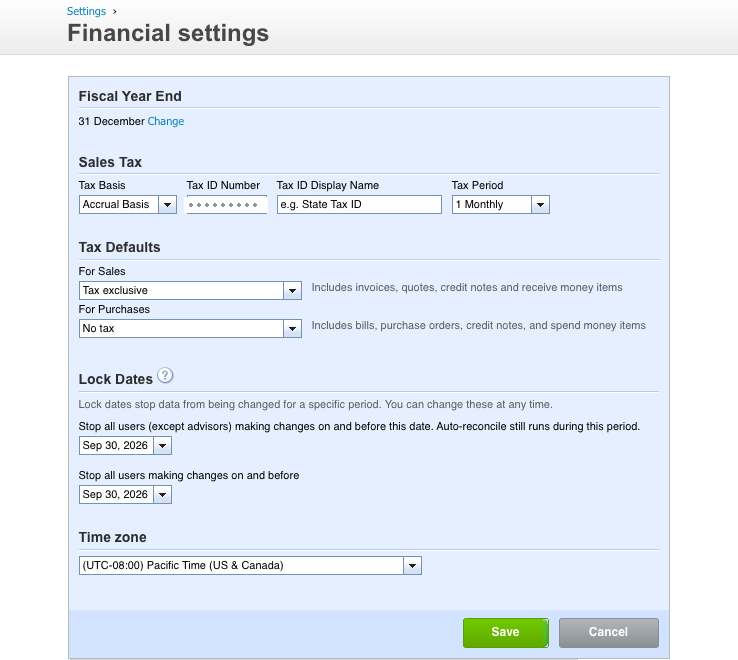
This is the most important close control in Xero. Once a lock date is in place, users cannot add, change or delete transactions dated on or before it. Setting and changing lock dates requires the advisor user role.
Users can still create draft invoices, bills and expense claims in a locked period and submit them for approval. The lock prevents posting, not preparation.
Powerful and almost unknown outside accounting practices. The assurance dashboard monitors the integrity of your data and highlights items worth checking, organized into tabs by activity type.
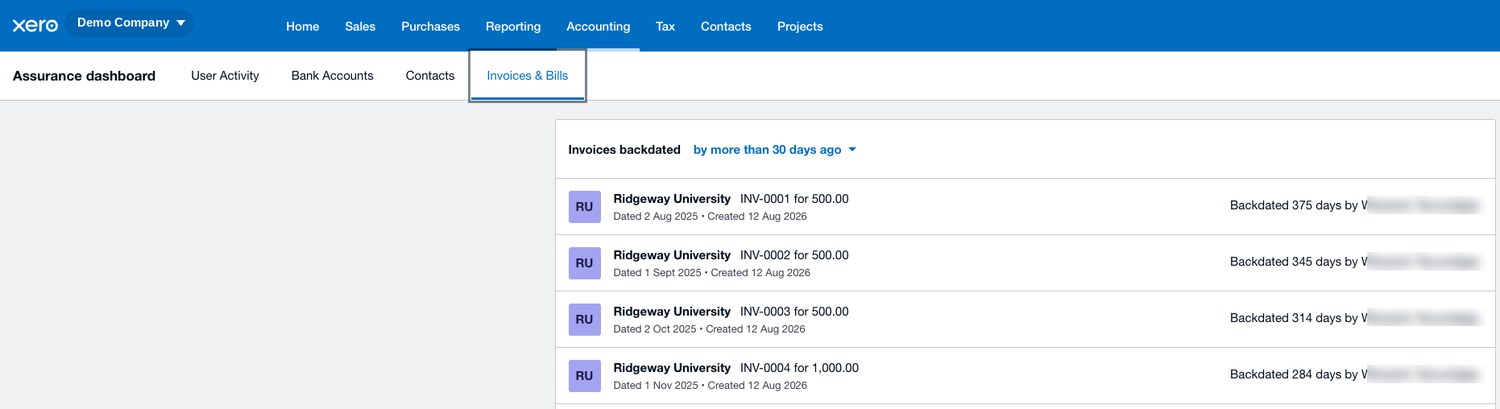
Running this before you lock is one of the highest-value five minutes in the whole close.
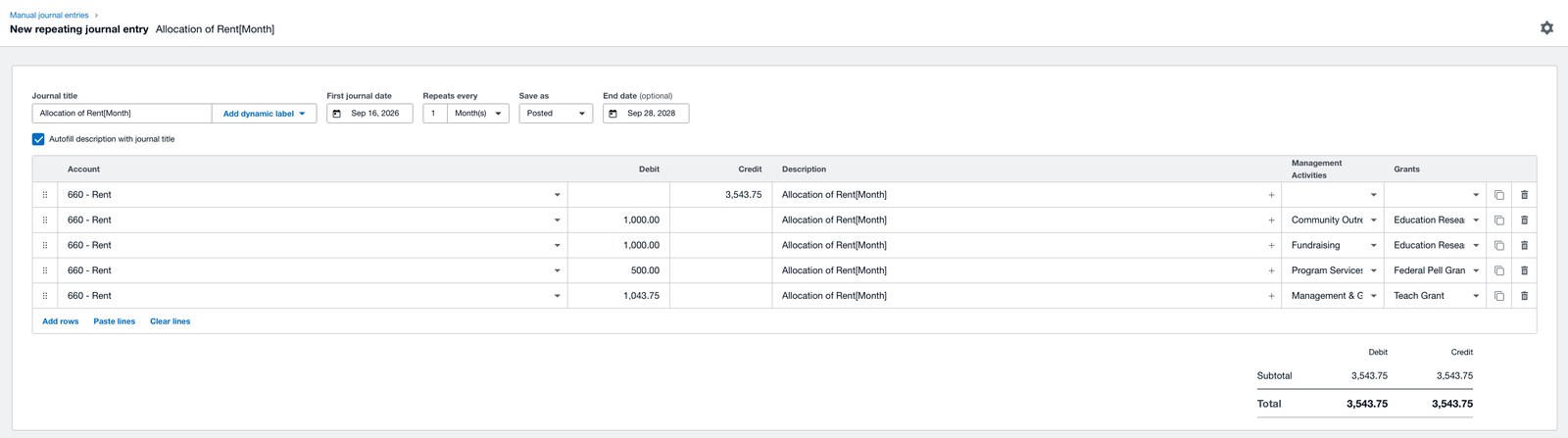
Depreciation, prepayment releases, recurring accruals and management charges are identical every month except for the date and the narration. Repeating journals generate them on a schedule so they stop depending on someone remembering.
They support placeholders in the narration and description fields, so the text updates with the period automatically. The month placeholder resolves to the journal's own month and can be offset, so a journal generated in April can describe itself as covering April to May. Small feature, but it is the difference between journals that document themselves and a year of entries all narrated "monthly accrual."
Because Xero's ledger stays live, a report run today reflects today's data. Publishing a report keeps a fixed record of the accounts as at a given date, which is what makes it possible to demonstrate later what you actually reported.
The working pattern is to build a draft set of financials while you are posting adjustments, review and revise, then publish once the numbers are final. Published reports become your evidence, and the lock date stops the underlying data drifting away from them. Publish at minimum the balance sheet, the profit and loss, and the general ledger detail, and download copies as well.
Xero's fixed asset register holds each asset with its cost, method and useful life, and runs depreciation for the period. Register assets when you acquire them and the monthly posting becomes a single action.
Skipping it is why so many small business balance sheets carry assets at original cost indefinitely, which overstates both assets and profit until somebody posts twelve months of depreciation in one entry at year end.
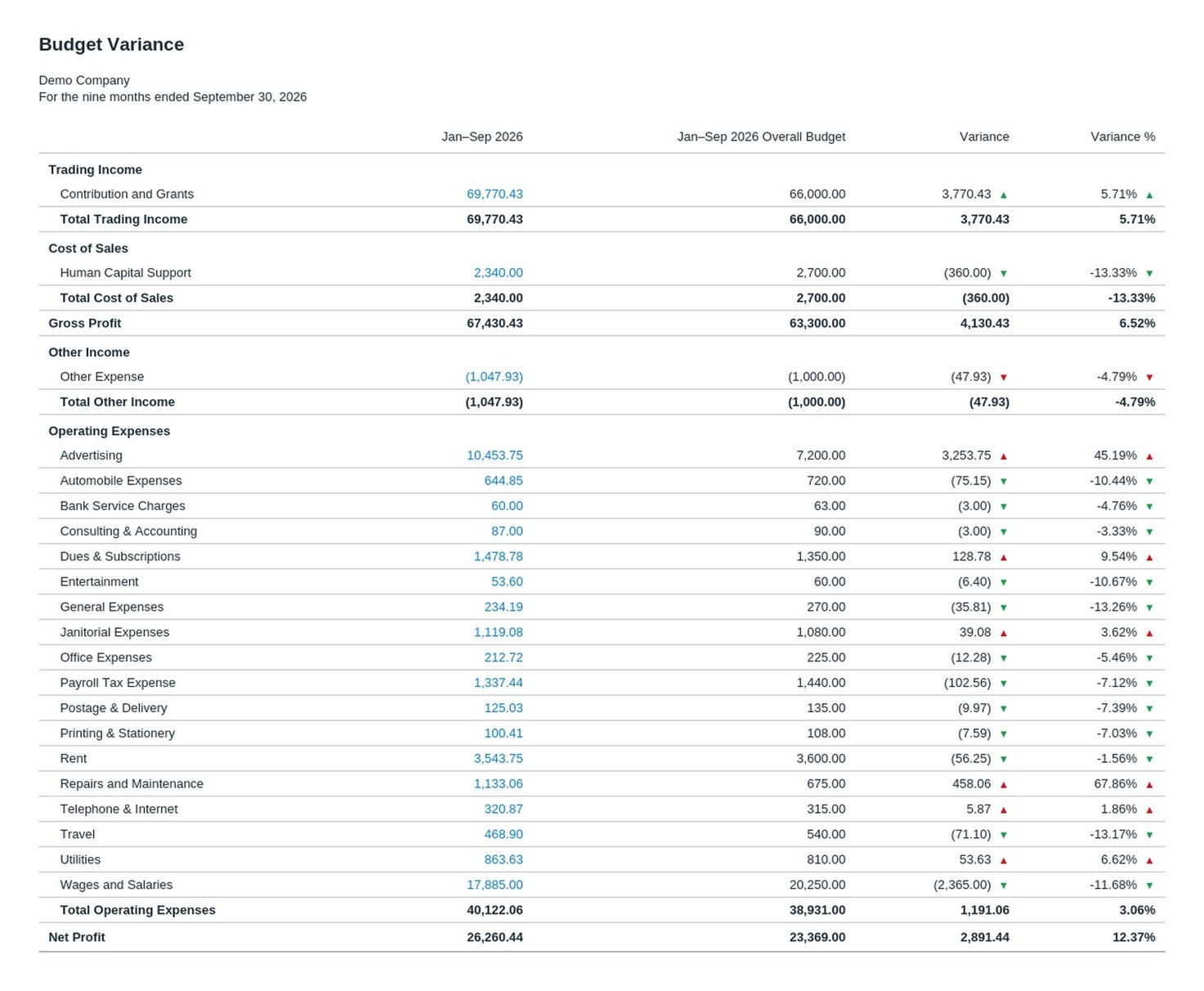
Variance review is a control, not just a management exercise. When an expense line comes in at three times budget, the cause is as likely to be a miscode as a real overspend, and comparing against budget is how you find it. A month closed without any comparison to expectation has passed no test at all.
Set budgets in Budget Manager and review the Budget Variance report as a mandatory step before locking. With no budget in place, compare against prior month and prior year instead. The point is having an expectation to test against.
Xero's dimension for reporting below the company level, by department, location, project or fund. Applied at the point of entry they make segmented close reporting straightforward. Applied afterwards they are a reconstruction exercise, which is why coding discipline through the month determines what your close can produce.
Every transaction carries its own history, and the organisation keeps an activity log covering its full history from creation. The audit trail cannot be edited or deleted by any user, administrators included, which is what makes it evidence rather than a convenience.
At close, the history and notes report answers the question that otherwise causes real friction: why does this month look different from when I last ran it?
Reference
The quick mapping. If a close task feels manual, check whether Xero already has a feature for it. Most teams are doing at least two of these by hand.
| Close task | Xero feature | Access needed |
|---|---|---|
| Verify banking for the period and keep proof | Reconcile period; Bank Reconciliation Summary report | Standard |
| Post recurring accruals, prepayments, management charges | Repeating journals with date placeholders | Advisor, or standard with reports |
| Post one-off adjustments | Manual journals | Advisor, or standard with reports |
| Calculate and post depreciation | Fixed assets register | Advisor |
| Tie subledgers to control accounts | Aged Payables and Aged Receivables Detail against the balance sheet | Standard with reports |
| Detect backdated or manually altered transactions | Assurance dashboard | Advisor |
| Check for duplicate or recently changed supplier bank details | Assurance dashboard, contacts tab | Advisor |
| Test results against expectation | Budget Manager and Budget Variance report | Standard with reports |
| Review segment or fund performance | Tracking categories on standard reports | Standard with reports |
| Preserve the numbers as reported | Published reports; report templates and advisor report packs | Standard with reports; advisor for packs |
| Freeze the period for most users | Reporting period lock date | Advisor |
| Freeze a filed period permanently | End of year lock date | Advisor |
| Explain why a prior period changed | History and notes report; activity log | Advisor for full log |
Order of operations
Most close problems are sequencing problems. Reviewing before adjusting means reviewing numbers that are about to change. Locking before publishing means the report you preserved may not match what was frozen.
The payoff
Run that sequence every month and the difference shows up well beyond the accounting. These are the things a properly closed month puts in your hands.
The tools are strong. The discipline is what turns them into a close. A written checklist, a named owner for the lock date, restricted access to organisation settings, and a monthly pass through the assurance dashboard. That is the part we run for our clients, every month, on the same day.
Questions
You close a month by completing the transactional work, verifying bank and card balances against statements, posting adjustments such as accruals, prepayments, depreciation and currency revaluation, reviewing for anomalies, tying subledgers to control accounts, reviewing the balance sheet and comparing the profit and loss to budget and prior period, publishing the final reports, and then setting the reporting period lock date to the last day of that month. The lock date is what holds the closed period in place.
A lock date prevents users adding, changing or deleting transactions dated on or before it. Xero provides two. The reporting period lock date locks the period for all users except advisors, and is the one you move forward each month at close, so advisors keep the ability to post corrections during an open financial year. The end of year lock date locks the period for everyone including advisors, and is intended for periods already filed. Setting or changing either requires the advisor user role. Users can still create drafts in a locked period and submit them for approval, because the lock prevents posting rather than preparation.
Reconcile period is a Xero feature built to support month-end close. It lets you compare bank transactions against your accounting records on a monthly basis and keep a report of the close-out for governance purposes. It is an optional addition rather than a replacement, so Xero's real-time reconciliation workflow continues to work exactly as before. The value is that it produces documented evidence the period was verified instead of leaving that verification implicit.
The assurance dashboard monitors the integrity of your Xero data and flags items worth reviewing. It requires advisor access. Before locking a month, check four things: backdated invoices and bills, filterable by period; manually deleted bank statement lines and transactions manually marked as reconciled; suppliers sharing duplicate bank account numbers or with recently edited bank details, which is a direct payables fraud check; and the user activity heat map, which shows who has been working in the file and when.
Almost always because no lock date was set. Xero's ledger stays live, so without a lock date a closed period remains editable, and someone tidying an old transaction in a later month changes the earlier period. The fix is twofold: publish reports at close to preserve a fixed record of the numbers as at that date, and set the reporting period lock date so the underlying data cannot drift away from them. The history and notes report will show you what changed and who changed it.
Use repeating journals for adjustments you post every month, such as depreciation, prepayment releases, standing accruals and management charges. They generate on a schedule, so the posting no longer depends on anyone remembering. Repeating journals support date placeholders in the narration and description fields, which resolve according to the journal's date and can be offset, so the description updates itself each period. Creating them requires the advisor role or standard access with reports permission.
Give it to a named person and make it the final step of the close rather than something done when someone notices. It requires advisor access, and access to organisation settings should be restricted to the same small group, so the control and the authority to change it sit together. For our clients this sits with the account lead and happens on the same day each month.
If the amount is material, unlock the period, post it with the correct date and a note explaining the reopening, re-publish the affected reports and re-lock. If it is not material, post it in the current open period and accept the timing difference. Accrual discipline is what keeps this rare, because a well-estimated accrual means the cost was already recognized in the right month before the document arrived.
For a small business with disciplined bookkeeping through the month, a close should complete within the first five business days of the following month, and much of it within two. The main determinant is not business size but whether transactional work was kept current. A close that begins with weeks of uncoded transactions is bookkeeping with a deadline attached. A close consistently taking longer than a week points to something upstream in the monthly routine rather than to the close itself.
Where to go next
We manage month-end close in Xero for startups, growing businesses and non-profits, as a Xero Gold Champion Partner and two-time Xero Asia Partner of the Year. A named team on your account, not a rotating pool.