
The Xero Handbook

Most of the pain in a Xero migration happens before you touch Xero.

Setting up Xero takes an afternoon. Setting it up so it still makes sense in three years takes longer, and the decisions that matter are made early. This is what those decisions are, in the order they arise, and which ones are expensive to reverse.

First

Before You Migrate Anything

A migration copies your accounting into a new system. It does not improve it. Whatever is wrong in the old file arrives intact in the new one, usually harder to see because nobody recognises the layout yet.

So the first question is not how to move, it is what state the source is in. Three things are worth establishing before any data moves:

  • Do the balances agree with something external? Bank and credit card accounts reconciled to statements, and the closing position for the last completed period tied out. If they do not agree now, they will not agree after the move, and you will spend the next quarter wondering whether the problem is the migration.
  • Is anything unresolved sitting in suspense? Undeposited funds, a clearing account nobody empties, an opening balance equity line left from the last system change. These carry across and become permanent if nobody deals with them first.
  • Does anyone know why the chart of accounts looks like that? Most charts accumulate rather than get designed. A migration is the one moment when restructuring costs almost nothing, and the last moment for a long time.

The honest sequence

If the answers are unclear, clean up first and migrate second. It feels slower and it is faster. Migrating a file you do not trust means doing the cleanup twice, once in a system you know and once in a system you do not.

Decision one

Choosing a Conversion Date

The conversion date is the point where the old system stops being the record and Xero starts. Everything before it comes across as balances; everything after it is entered in Xero.

The start of a financial year is the cleanest choice. Comparatives are whole years, your tax preparer works from one system for the year, and there is no split period to explain. If you are within a couple of months of year end, waiting is usually worth it.

The start of a quarter is the practical compromise. Common, workable, and the reason most migrations happen when they do. It means one year of accounts spans two systems, which is manageable as long as everyone knows.

Mid-month is a decision to avoid. Partial periods make reconciliation ambiguous and every comparison needs a footnote.

Decision two

Designing the Chart of Accounts

This is the decision with the longest shadow. The chart of accounts determines what questions your reports can answer, and changing it later means recoding history or losing comparability.

The most common mistake is importing the old chart unchanged because it is easier. The second most common is the opposite: rebuilding it from scratch so nothing reconciles to prior years. What works is a deliberate middle course.

  • Keep the structure your reporting actually uses. If nobody has ever looked at a line, it does not need to survive.
  • Collapse accounts that exist because of a coding habit. Six travel accounts usually mean one travel account and a tracking category.
  • Use tracking categories for the dimensions, not accounts. Department, location, service line and fund belong in tracking, not in the account code. This is the single change that most improves reporting for multi-location and non-profit clients.
  • Match the tax lines your preparer needs. The chart should map cleanly onto the return, so year end does not require a translation exercise.
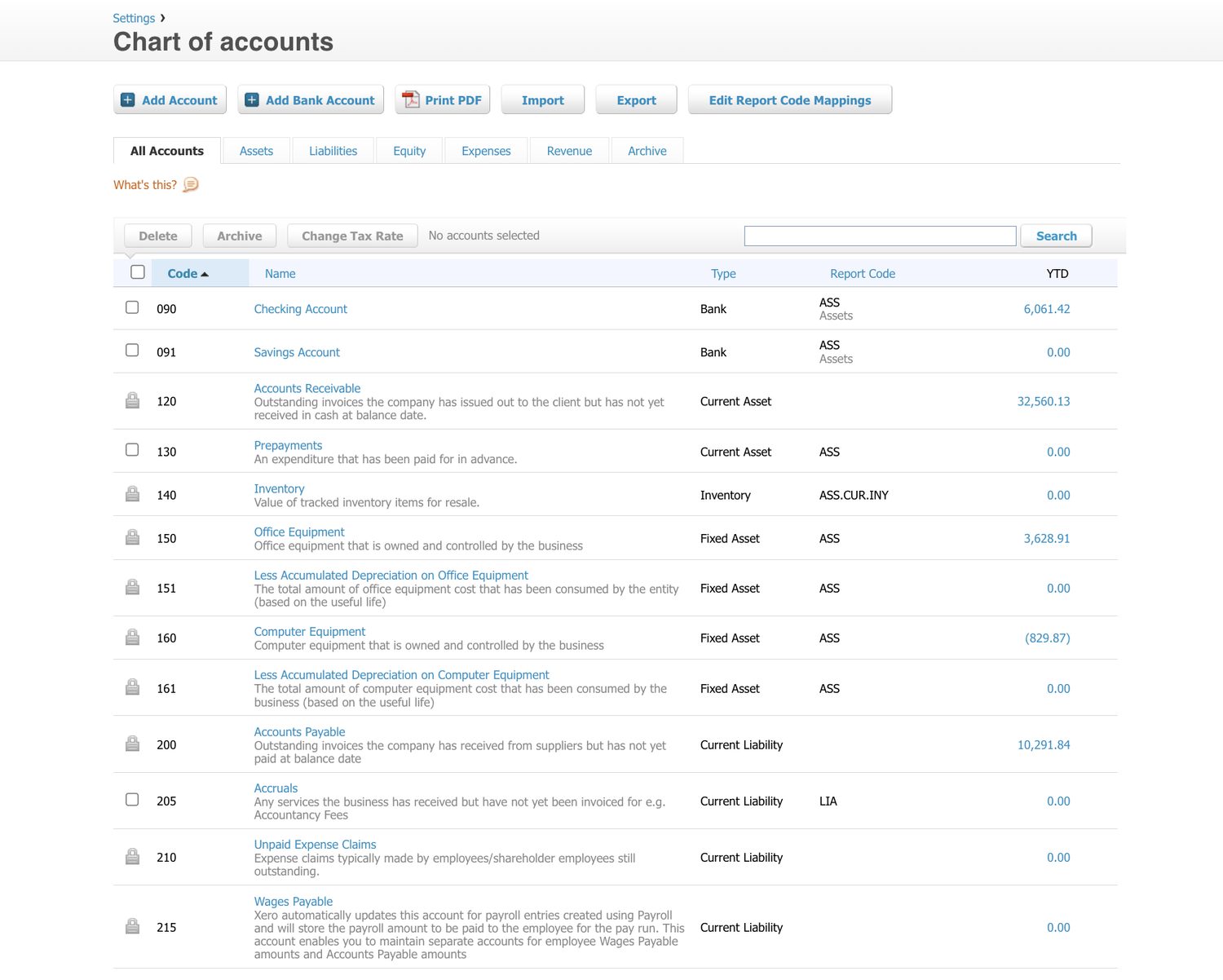
  • Leave numbering room. Codes with gaps let you add accounts in the right place later instead of appending them at the end.
Xero's chart of accounts, listing account codes, names, types and report codes for bank, current asset, fixed asset and current liability accounts.
Screenshot: part of a chart of accounts in Xero, shown with Xero’s own demo company data. Note the numbering: gaps between codes leave room to add accounts in the right place later rather than appending them at the end. This is Xero software, not a Logiframe product, and the figures are illustrative. Xero is a trademark of Xero Limited.

Decision three

Conversion Balances

Conversion balances are the opening position on the day Xero takes over: what you own, what you owe, and the accumulated result of everything before. They are entered once and they anchor every report that follows.

Two rules make this straightforward. They must come from a set of accounts someone has signed off, ideally the last filed or reviewed period rather than a live figure that is still moving. And they must balance: assets equal liabilities plus equity, with the difference carried in retained earnings rather than an equity plug that nobody can explain later.

Outstanding invoices and bills are entered individually, not as a single receivables or payables total, because the aging has to work from day one. That means listing every unpaid invoice and bill at the conversion date, which is tedious and not optional.

The line to watch

If a historical adjustment appears after go-live, resist the urge to post it against conversion balances. Post it in the period it belongs to, or as a documented current-period adjustment. Editing opening balances after the fact is how a file stops agreeing with the accounts it was built from.

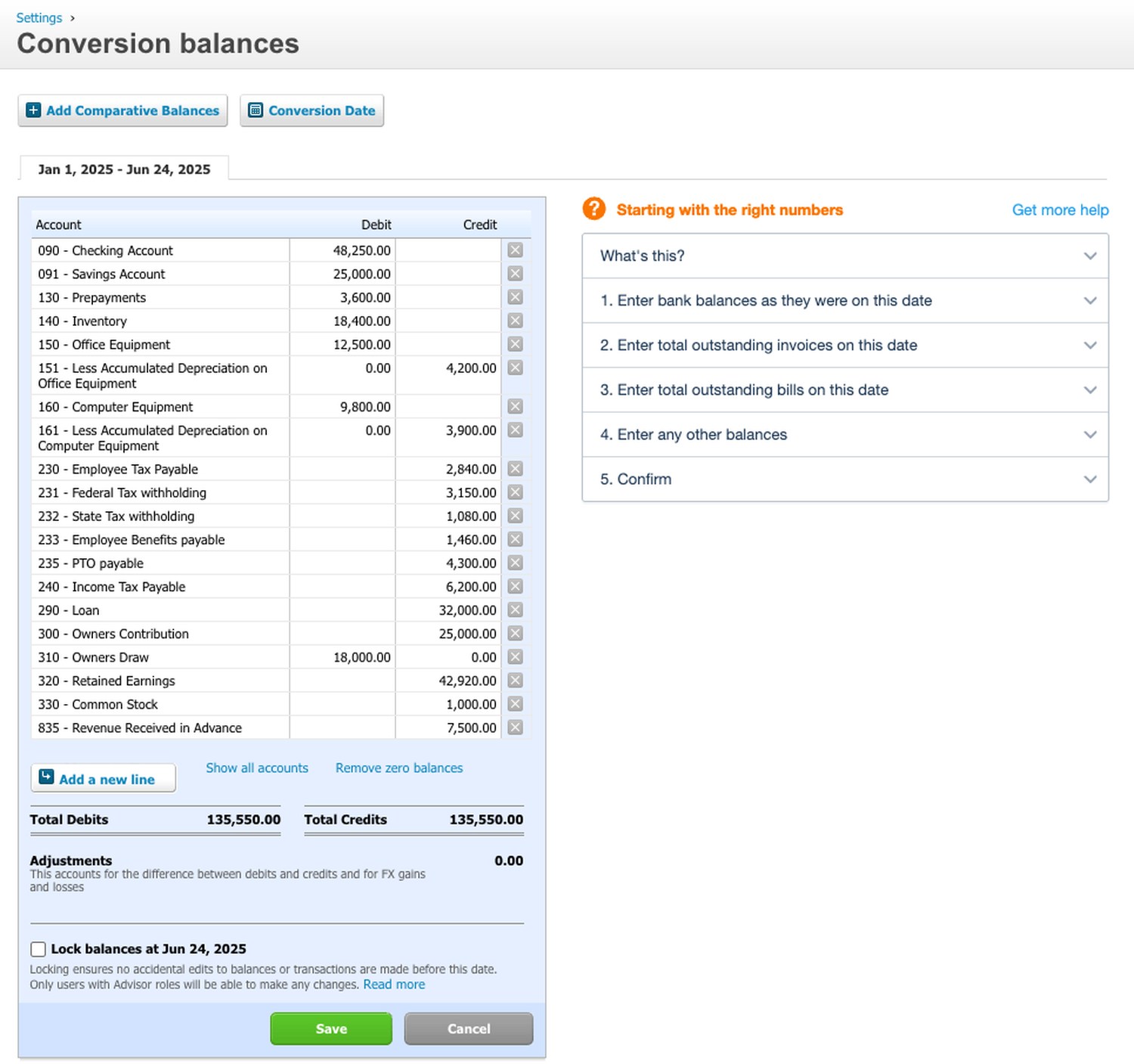
Xero's conversion balances screen with an opening trial balance entered: cash, prepayments, inventory and equipment in the debit column, accumulated depreciation, payroll liabilities, a loan, equity and deferred revenue in the credit column, total debits equal to total credits, and the adjustments line showing zero.
Screenshot: conversion balances in Xero, shown on a demo organisation. Read the Adjustments line first. At zero, the opening position balances on its own. Any figure there is Xero absorbing a difference you have not explained yet, and it will sit in your books from day one. Receivables and payables are not entered here. They come in through steps 2 and 3 as outstanding invoices and bills. This is Xero software, not a Logiframe product, and the figures are illustrative.

Decision four

How Much History to Bring

Xero does not require historical detail to work. The question is what you lose without it, and the answer depends on who needs to look back.

  • Balances only. Fastest and cheapest. You get a clean file with no comparatives, and the old system has to be kept accessible for anything historical.
  • One full prior year of transactions. The usual choice. Year-on-year comparison works, the tax preparer has continuity, and the volume is manageable.
  • Multiple years. Worth it for businesses being valued, raising, or in a regulated sector. Expensive, and every additional year multiplies the reconciliation work.

Whatever you choose, keep the old system readable for the statutory retention period. Migrating is not archiving, and a cancelled subscription can take your history with it.

Decision five

Connecting the Rest

Xero rarely sits alone. Bank feeds, a payroll provider, receipt capture, and whatever runs sales or inventory all have to connect, and the order matters.

Bank feeds first, because they take longest to establish and some connections need bank-side authorisation. Set them up before go-live so the first reconciliation is not also a troubleshooting exercise.

One system at a time after that. Connect, post a few transactions, check they land where you expect, then move on. Connecting five apps at once and discovering the numbers are wrong tells you nothing about which one is responsible.

Decide what posts in detail and what posts as a summary. A high-volume sales channel posting every line will make the file slow and the reconciliation unreadable. Daily totals with the detail held in the source system is usually the better design, and it is much harder to change later.

The expensive ones

What Is Hard to Undo

Most setup choices can be changed in an afternoon. These cannot, and they are worth deciding slowly.

  • The conversion date. Changing it after transactions exist means redoing the opening position and re-entering everything since.
  • The chart of accounts structure. Renaming is easy. Restructuring after a year of coding means bulk recoding history and losing the comparability you migrated for.
  • Tracking categories. Xero allows two. Choosing the wrong two, or using an account code for something that should have been a tracking category, is the most common regret we see.
  • Detail versus summary posting from connected apps. Reversing this means unpicking months of postings.
  • The accounting basis. Moving between cash and accrual after go-live is not a setting change; it changes what your reports have been saying.
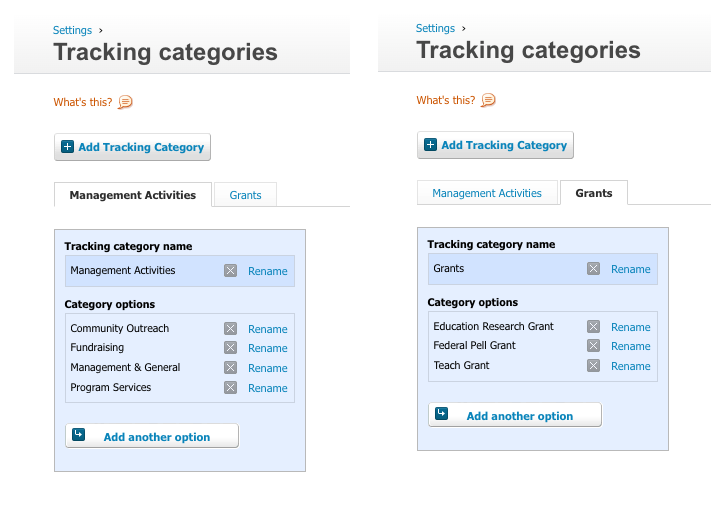
Xero's tracking categories screen shown with each of its two tabs selected. The first category holds four options and the second holds three, and there are no further tabs.
Screenshot: tracking categories in Xero, shown on a demo organisation with each tab selected in turn. Two tabs, and that is the ceiling. Xero allows two tracking categories per organisation, so a business that wants department, location and fund has to decide which of the three it can live without in the ledger. Options within each category are unlimited, which is why the choice of the two dimensions matters more than anything inside them. This is Xero software, not a Logiframe product.

Go-live

Going Live Without Holding Your Breath

The last step is the one people skip. Before the old system is switched off, run one period where the numbers are checked against something known: reconcile every bank and card account to a statement, agree the receivables and payables totals to the aging reports, and check the trial balance against the closing position from the old system.

If those three agree, the migration worked. If they do not, the gap is findable now and much harder to find in six months.

Then set your lock dates. A migrated file with no lock date invites someone to post into the conversion period, and that is how an opening balance quietly stops matching the accounts it came from.

Xero Gold Partner Certified advisors, with Xero as the platform our depth genuinely sits in.
Xero Asia Partner of the Year Recognised by Xero for delivery, not for sales volume.
13+ years, 1,500+ engagements Across accounting outsourcing, ERP and accounting software work.

Questions

Setup and Migration, Answered

How long does a migration take?
For a single entity with clean records and one prior year of history, a few weeks including checking. The variable is almost never the software. It is the state of what you are migrating from and how quickly questions get answered.
Can I move from QuickBooks without losing history?
You can bring history across, but how much and how cleanly depends on the source. Balances and a prior year of transactions is the usual scope. Keep the old file accessible regardless: migrating is not archiving.
Do I have to clean up before migrating?
Not always, but if the accounts do not currently reconcile to a statement, cleaning up first is faster overall. Migrating a file you do not trust means doing the cleanup twice, and the second time in a system nobody knows yet.
What happens to my old system?
Keep it readable for your statutory retention period. Export what you can before any subscription lapses, because access usually ends with the billing.
Can you do the migration for us?
Yes. We design the chart of accounts, set conversion balances, connect the apps, run the checks before go-live and take over the monthly bookkeeping afterwards if you want us to. Where a cleanup is needed first, we quote that separately so you can see what each part costs.

Thinking about moving to Xero?

Tell us what you are on now and what state it is in. We will tell you whether to clean up first, what the migration involves, and what each part would cost.

Talk about a migration See the 32-point check