Every app you connect to Xero is another thing that has to reconcile.
The app store is one of the reasons people choose Xero, and one of the reasons some Xero files become unreadable. Connecting is easy. Deciding what should connect, how it should post, and who owns it when it quietly stops working is the part that takes judgement.
Xero is a general ledger with a reconciliation engine and an invoicing front end. It is deliberately not a warehouse system, a payroll engine, a procurement tool or a reporting suite. That restraint is why it stays usable, and it is the whole reason the app layer exists.
Which leaves a choice for everything Xero does not do natively. You can run it in a spreadsheet, run it in a connected system, or force it into the ledger by making Xero hold operational detail it was never designed for.
The third option is the most common and the most expensive. Stock levels tracked through journal entries, project profitability reconstructed from account codes, purchase approvals living in an email thread that ends at a bill. It works until it does not, and by then the ledger is where operations live and nobody can close the month without unpicking it.
The rule worth holding on to: Xero should hold the accounting consequence of an event. The system where the event happens should hold the detail behind it.
The filter
Which Connections Earn Their Place
An integration is not free because the subscription is small. It is a system someone has to own, monitor, and eventually unwind. Two tests decide whether it is worth that:
Does it remove a step someone repeats every week? Weekly, not quarterly. Automating something that happens four times a year rarely repays the setup and the ongoing attention.
Does it become the system of record for something Xero should not hold? Stock, purchase approvals, employee records, sales orders. If the answer is yes, the integration is not a convenience, it is structural.
If neither test is met, what you have is a subscription with a login. And before connecting anything that passes, three questions are worth answering out loud:
Who owns it? A named person, not a department. Integrations fail silently, and unowned things fail longest.
What does failure look like? If the sync stops on a Tuesday, what is the first visible symptom, and how long before someone sees it?
Can you unwind it? If you cancel the app in a year, what happens to everything it posted, and does the ledger still make sense without it?
The hardest app to justify
It is almost always the second one doing the same job. Two overlapping tools posting to the same accounts is where most duplicate transactions come from, and the duplication is rarely obvious, because each app is behaving exactly as configured.
Design decision
How Data Actually Arrives
Integrations differ less in what they connect than in the shape of what they post. There are three shapes, and the one you pick determines how the file reconciles for as long as the connection exists.
Shape
What lands in Xero
Works when
Goes wrong when
Transaction level
Each invoice, bill or payment as its own document
Volume is low to moderate and someone genuinely needs per document detail in the ledger
Volume is high. The file slows, and the reconcile screen becomes something people avoid
Summary journal
A periodic journal, usually daily, carrying totals by account
A high volume channel where the detail belongs in the source system anyway
The journal does not tie to the bank deposit, or the summary quietly nets a fee you never see
Two way sync
Records kept aligned in both directions: contacts, items, sometimes invoices
Master data has to be consistent in two places and one side is clearly authoritative
Both sides can edit the same field. The last write wins, and nobody is told
What the platform itself allows
The shape decision is not only a question of taste. Xero publishes hard limits on how much an integration can push through its API, and those limits apply to every app on the platform equally.
Five calls at once, 60 a minute, 5,000 a day. The limits are counted per connected organisation, so each Xero organisation an app connects to has its own daily allowance.
They cannot be raised. Xero states the rate limits are identical for every app, so an integration that outgrows them has to be redesigned rather than upgraded.
Going over does not look like a failure from where you sit. The app receives a 429 response and a header telling it how long to wait. A well built integration backs off and retries, which reaches you as data arriving late rather than as an error anyone reports.
Syncing a single invoice rarely costs a single call, because the contact, the document and the payment are separate operations. That arithmetic is the mechanical reason a busy sales channel posting every transaction individually eventually falls behind, and why a daily summary keeps working. Current limits are published on Xero’s developer site.
This choice belongs on the short list of things that are painful to reverse. Switching a sales channel from detail to summary after a year means unpicking months of postings and rebuilding the comparatives. It is worth deciding deliberately at setup rather than accepting whichever default the app ships with. The other decisions in that category are on the setup and migration page.
In practice
What Most Businesses Actually Connect
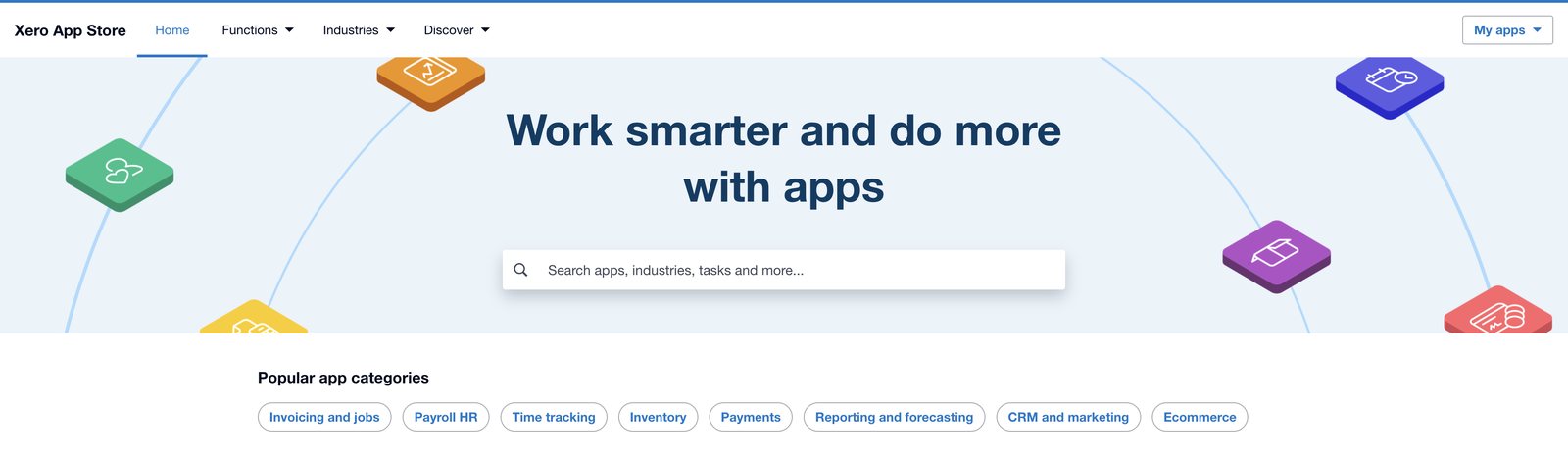
Screenshot: the Xero App Store, organised around what you could add. The harder question, and the one this page is about, is what you should. The My apps control at the top right is the more useful destination: it lists what is already connected to an organisation, which is where the audit further down this page starts. This is Xero software, not a Logiframe product. Xero is a trademark of Xero Limited.
Roughly in order of how easily each one justifies itself:
Bank and card feeds. The one connection that is not really optional. Everything after this is a judgement call.
Document capture. Bills and receipts arriving as data rather than as email attachments someone retypes. Hubdoc is included with Xero business plans, which settles the cost argument before it starts.
Approval and spend control. Tools like ApprovalMax and Precoro start to matter the moment more than one person can commit the company to money.
Bill payment. Platforms such as BILL move approved bills to payment. Worth being clear about the boundary: we prepare and reconcile, and the authority to release funds stays with you.
Inventory. Unleashed, Cin7 and similar. Once stock exists, Xero should carry the value and the movement should live somewhere built for it.
Payroll. Gusto and others. Payroll runs in the payroll system and reaches Xero as a journal. We reconcile that journal. We run payroll ourselves in QuickBooks Workforce and Gusto.
Reporting and consolidation. Syft and comparable tools do the management packs and multi entity consolidation Xero does not do natively.
CRM. HubSpot and similar, so a quote becomes an invoice without being typed twice.
The glue layer, and where to stop using it
Zapier, Make and the low code builders belong in a different category from everything above. They hold nothing. They move events between systems that have no native connection, and for that they are genuinely useful: a signed contract creating a task, an approved bill triggering a notification, a form submission reaching the CRM.
The line worth drawing is at the ledger. A workflow tool that creates invoices, bills, contacts or payments in Xero is a bookkeeping process with no owner, no reconciliation, and no audit trail beyond a run history somebody has to remember to open. It breaks on renamed fields, changed schedules and expired authorisations, and nothing announces it. The first sign is a month that will not close.
This matters more than it did two years ago, because building one no longer takes a developer. An automation assembled in an afternoon can keep posting to your general ledger long after the person who built it has left.
So use the glue layer for notifications and handoffs. For anything that creates an accounting record, use either a purpose built integration that can be reconciled, or a rule inside Xero itself.
The overview page has the fuller table of what we work alongside and what each system is actually for.
The failure modes
Where Integrations Quietly Break Reconciliation
None of these announce themselves. They show up a month or two later as an account that will not agree and a close that keeps slipping.
Two sources creating the same transaction. The bank feed brings in the payment, and the connected app creates it as well. What you see is not a duplicate flagged in red, it is a remainder that refuses to reconcile.
Gross against net. A payment processor deposits after its fee. If the integration posts the sale gross and the bank shows net, the fee has to land somewhere deliberate, or the account will never agree by design.
Dates that do not line up. Two systems cutting off at midnight in two different time zones will produce two different totals for the same period, every period.
Refunds, chargebacks and part payments. Usually handled properly in the source system and awkwardly in whatever summary reaches Xero.
Sales tax applied twice. The channel calculates it, the integration posts it, and a default tax rate in Xero applies again on arrival.
Nobody owns the failure. Syncs stop. Authorisations expire, an API changes, someone revokes access. The first symptom is usually a month that will not close.
The clearing account test
Any integration that moves money through an intermediary needs a clearing account, and a clearing account doing its job returns to zero. If yours has grown steadily since the connection was switched on, that balance is the accumulated difference between what the app says happened and what the bank says happened. Checking it monthly is the cheapest early warning available.
Before you buy anything
Already in Xero, and Switched Off
Most files do not need another app. They need the configuration nobody went back and finished after go live.
Bank rules. The setting with the best return in Xero, and the one most often left at whatever was created in the first week.
Default account codes on contacts. Coding decided once per supplier instead of being decided again on every bill by whoever happens to open it.
Repeating invoices and bills. Anything with the same amount on the same day every month should not be typed again.
Invoice reminders. Configured once, sent under your own business name, on a schedule you set. The conversation stays yours; the sequence runs itself.
Tracking applied at the source document. Categories added at coding time rather than reconstructed later is the difference between reporting by department and estimating by department.
Lock dates and user roles. Both take minutes, and both prevent the class of problem that is expensive to unwind.
None of this is an integration, and all of it is usually cheaper than one.
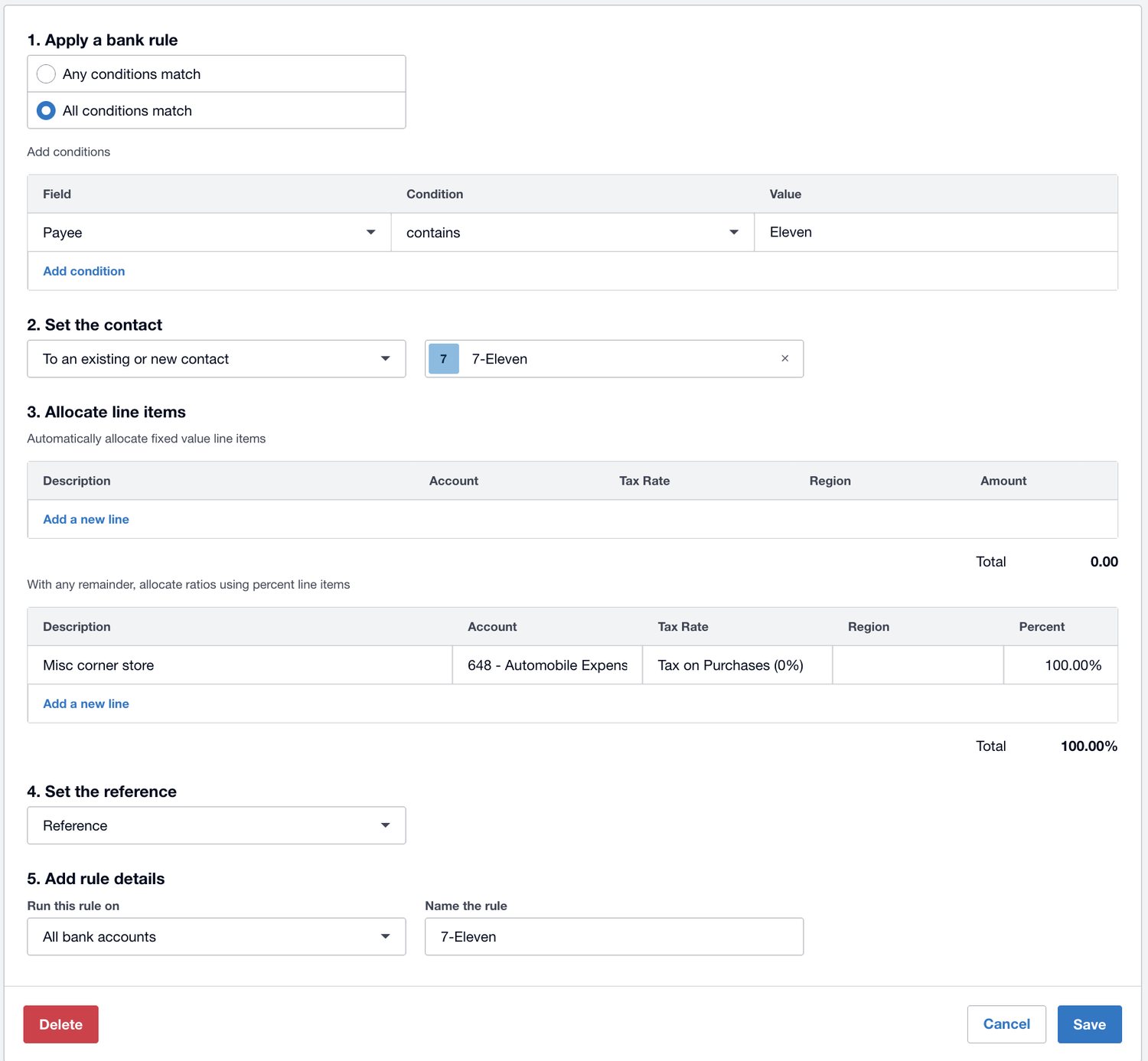
Screenshot: a bank rule in Xero, shown with demo data. One condition on the payee, and the rule then sets the contact, codes the whole amount to an expense account, applies the tax rate, and can carry a tracking category, on every matching transaction across all bank accounts. The coding decision is made once here rather than being made again each week by whoever opens the reconcile screen. This is Xero software, not a Logiframe product, and the figures are illustrative. Xero is a trademark of Xero Limited.
The procedure
Auditing What You Have Connected
Worth running once a year, and worth running immediately after anyone who set up an integration leaves.
Step one
List
Open the connected apps list in Xero settings and write down every connection, including the ones nobody remembers authorising.
Step two
Assign
A named person against each one. If a connection has no owner, that is the finding, before you look at anything else.
Step three
Trace
Follow one transaction end to end for each connection. Where it starts, what posts, which account it lands in, and whether that is where you thought.
Step four
Clear
Every clearing and suspense account back to zero, or a written explanation of why it is not. Balances without explanations become permanent.
Screenshot: the connected apps screen in Xero settings, shown on a demo organisation with a single connection. A working file is usually longer, and the useful part of the exercise is the entries nobody present recognises. Note also what the one entry here is: an AI assistant appears in this list like any other application, with the same disconnect control, which is the argument the next section makes. This is Xero software, not a Logiframe product. Xero is a trademark of Xero Limited.
The newest connection
AI Access Is a Connection Too
The most recent additions to the app layer are not apps. They are assistants and agents reading directly from your ledger, and they deserve the same scrutiny as anything else that connects.
Xero has its own assistant, JAX, available inside Xero and answering within whatever permissions the user already holds. Alongside it, Xero has built connections that put live ledger data into the tools people already work in: a certified connector for Microsoft 365 Copilot, and a plugin for ChatGPT. Underneath all of it sits a server Xero runs that lets a language model query a Xero organisation at all.
Claude connects through that server, authorised the same way any other connection is. No developer setup, no keys to store, just an approval screen. It gives you around twenty tools covering reports and records. Profit and loss, balance sheet, cash position, aged receivables and payables, the chart of accounts, tracking categories, bank transactions, bills, invoices, purchase orders, contacts. In the current build every one of them reads and nothing writes, which means you can ask a question of your live ledger in plain English and get an answer back in seconds, without exporting anything and without anyone being able to change a figure through the conversation.
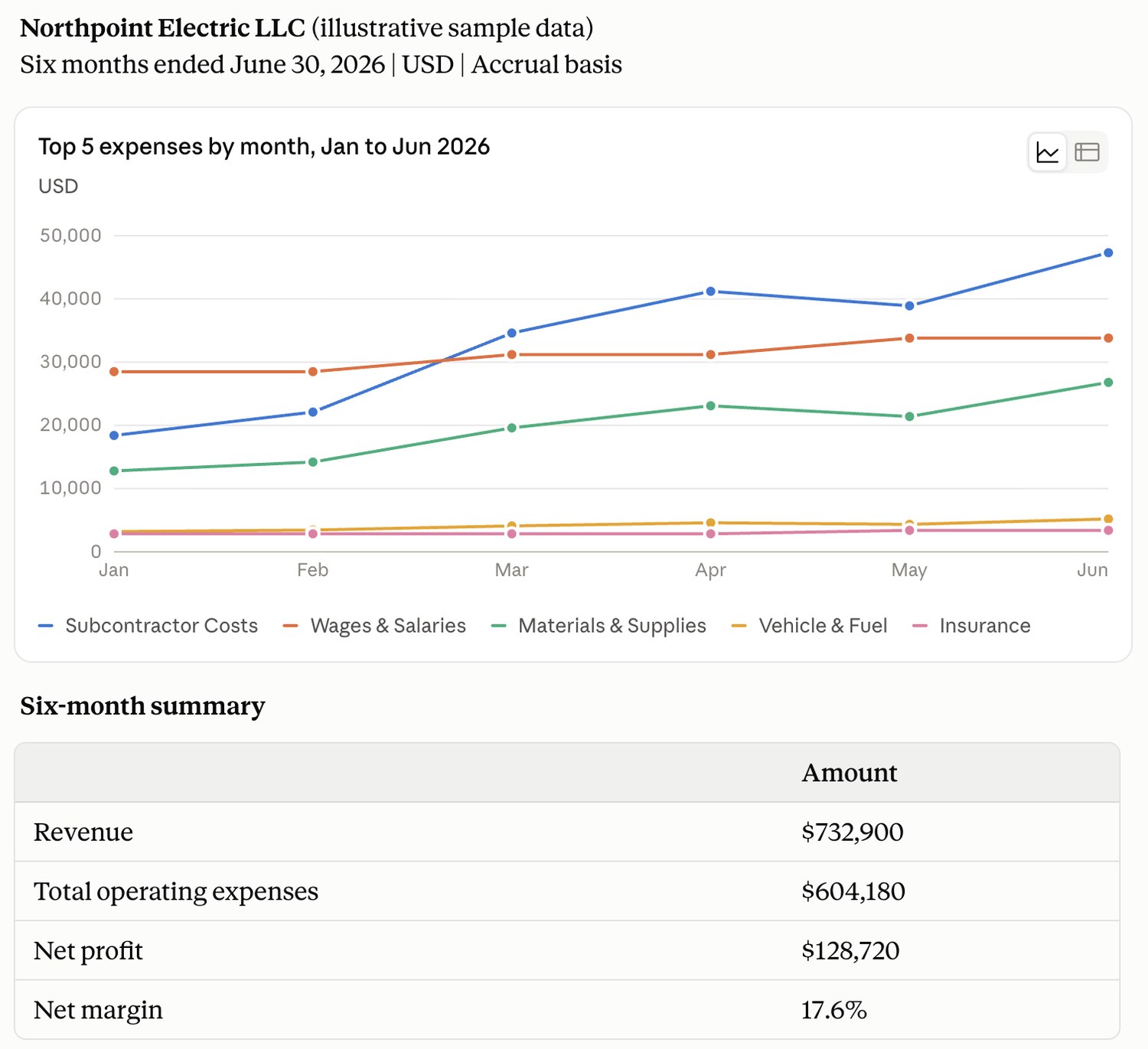
A question asked in plain English, answered from the ledger: six months of expenses charted by category, with revenue, profit and margin summarised underneath. Shown on illustrative sample data.
Two things to set deliberately. The authorisation follows the login, not the file, so one approval reaches every organisation that person can see. Decide whose login it runs under. And the 1099 endpoint returns legal names, W-9 status and TIN matching results, so contractor identity travels with it.
The part that does not change is the ledger underneath. An assistant answers from what is in the file, at conversational speed and with total composure, whether or not the bank agrees.
The same questions apply without modification, and two of them get sharper:
Scope. Xero’s own assistant answers within the permissions the user already has. A connection authorised through a separate tool carries whatever access was granted at the moment someone clicked approve, which is not always the same thing, and can reach further than one organisation. Read the approval screen.
Ownership. Who authorised it, under whose login, and what happens to that access when that person changes role or leaves.
Reversibility. Revoking access takes a minute. Reconstructing what was read while it was connected takes considerably longer, if it can be done at all.
Verification. An answer drawn from your ledger is only as reliable as the ledger. A confident summary of an unreconciled file is a confident summary of nothing.
That last point is why this section sits at the end of a page about integrations rather than at the top of it. The direction of travel is not in doubt: the platform will keep absorbing the mechanical work, and it will keep getting better at it. What it does not absorb is whether the numbers underneath were right to begin with, and that question gets more consequential, not less, as more decisions are made from answers rather than from reports.
Xero Gold PartnerCertified advisors, with Xero as the platform our depth genuinely sits in.
Xero Asia Partner of the YearRecognised by Xero for delivery, not for sales volume.
13+ years, 1,500+ engagementsAcross accounting outsourcing, ERP and accounting software work.
Questions
Integrations, Answered
How many apps should we be connecting?
Fewer than the app store implies. Bank feeds, document capture, and whatever holds the operational detail Xero should not be holding. Past that, each connection has to name the weekly step it removes.
Will an integration fix our reconciliation problems?
No. An integration automates the process you already have. If that process is unclear, the integration makes the unclear part happen faster and in higher volume. Fix the process, then automate it.
Should sales post in detail or as a summary?
It depends on volume and on whether anyone actually reads per transaction detail in the ledger. High volume channels are usually better as a daily summary, with the detail held in the source system. Decide before go live, because reversing it means unpicking months of postings.
Our sync stopped and nobody noticed for weeks. How do we catch that earlier?
A monthly look at the clearing account, and a check that one known recent transaction made it across. Silent failure is normal behaviour for integrations. Detection has to be a habit, because it is not a feature.
Is there a limit to how much an integration can push into Xero?
Yes, and it is published. Xero allows five simultaneous API calls, 60 a minute and 5,000 a day for each connected organisation, and the same limits apply to every app on the platform. They cannot be increased. Since one invoice usually takes several calls to create, a high volume channel posting each transaction separately can reach the daily ceiling, at which point the integration slows and backs off rather than announcing a problem.
Should we connect an AI assistant to our Xero?
Apply the same tests as any other connection: who authorised it, what access it was granted, and how you revoke it. Then one more that is specific to this kind of tool. An answer is only as good as the file it is drawn from, so an assistant reading an unreconciled ledger will give you confident answers built on numbers that do not agree with the bank.
Can you manage this for us?
Yes. We review what is connected, what each connection posts and where it lands, then run the monthly bookkeeping on top of it. Where an integration is the wrong shape for your volume, we say so before building a close process around it.
Most files have at least one connection nobody owns and one account that never clears. Tell us what you are running and we will tell you what it is doing to your books.