Xero suits most small businesses. We connect the rest of the stack around it.
What Xero does well, where it runs out of road, and how to tell which side of that line your business sits on. Written by a Xero Gold Partner who also implements the systems that sit alongside it.
Xero is cloud accounting software. Your bank feeds transactions into it, you code and reconcile them, and it produces financial statements from what it holds.
That description sounds trivial, but the word doing the work is cloud. Your accountant, your bookkeeper and you are all looking at the same file at the same time, from anywhere. There is no file to email, no version to be out of date, and no question about whose copy is right. For a business with an offshore bookkeeper, a US CPA and an owner who travels, that single fact is most of the value.
What Xero is not is a system that keeps itself correct. It records what it is told. Feeds deliver transactions, rules suggest codings, and reports assemble whatever is in the ledger. None of that is the same as someone deciding the numbers are right, which is the distinction the rest of this handbook is about.
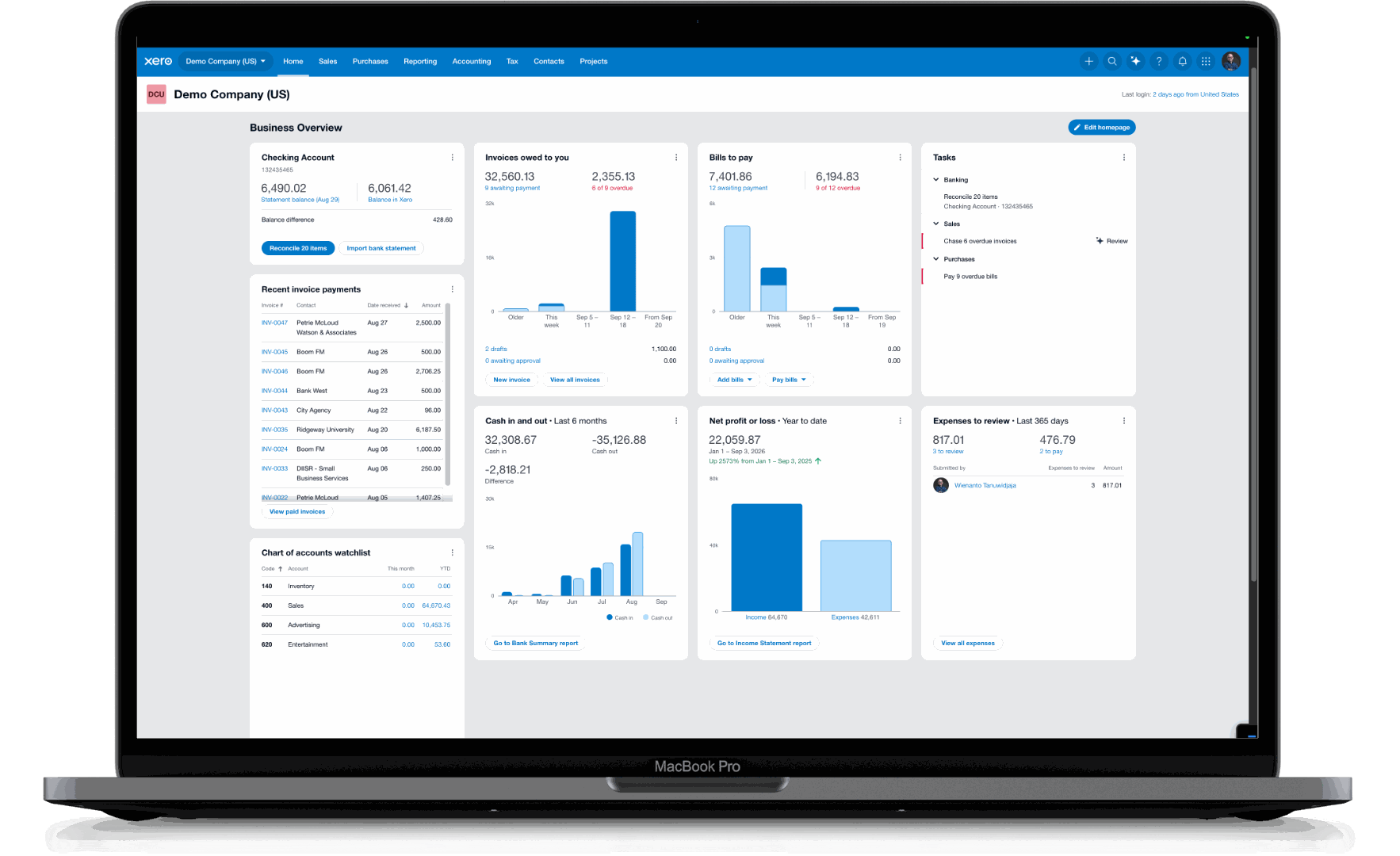
Xero runs in a browser. You, your bookkeeper and your accountant all work in the same file at the same time. Shown with Xero’s own demo company data. This is Xero software, not a Logiframe product, and the figures are illustrative. Xero is a trademark of Xero Limited.
Good fit
Who Xero Suits
The pattern is consistent. Xero fits businesses whose accounting is service-shaped or simple-product-shaped, who value working with their advisors in the same file, and whose complexity lives in the workflow rather than in the manufacturing.
Professional services firms. Agencies, consultancies, law firms, accounting practices. Time, projects and billing are the complexity, and Xero's app ecosystem handles that layer well.
Small and mid-sized service businesses. Clinics, trades, property managers. Predictable transaction volume, straightforward revenue, a handful of accounts.
Businesses with entities in more than one country. Multi-currency is native rather than bolted on, and consolidation across entities is handled by Syft, which is now a Xero product.
Non-profits. Tracking categories handle restricted and unrestricted funds without a separate fund accounting system, up to a point.
Anyone whose accountant already works in it. Underrated. Software your advisor uses daily beats marginally better software they use monthly.
Capability
The Systems We Work With Alongside Xero
Xero is a strong general ledger with a deliberately open ecosystem, which means it sits at the centre of a finance stack rather than trying to be all of it. That is an advantage. It lets a growing business add exactly the capability it needs, when it needs it, instead of buying an ERP on day one and paying for modules it will never open.
Our job is choosing the right combination, implementing it, and keeping it running once it is live. These are the systems we work with most often, and the businesses they suit.
Systems we work with alongside Xero
System
What it adds
Who it is for
Unleashed
Production and inventory: bills of materials, work in progress, multi-stage costing, warehouses, landed cost and stock valuation, posting results into Xero.
Manufacturers and inventory-led businesses
Cin7
Multi-channel sales, fulfilment and stock valuation reconciled back to the ledger without re-keying between systems.
E-commerce and multi-channel sellers
ApprovalMax
Multi-level authorisation on bills and purchase orders, delegation rules, and a complete audit trail of who approved what and when.
Businesses that need real spend control
BILL
Bills captured, coded and routed for approval, then paid from your own account once you release them. Approval trail and payment record stay together.
Businesses paying a high volume of suppliers
Precoro
Purchase requisitions, budget checking and supplier management before the invoice arrives, so spend is approved before it is committed.
Procurement-led organisations
Hubdoc
Bills and receipts captured by photo, email or upload, with the data read automatically and the source document attached to the transaction in Xero. Included with most Xero plans.
Anyone still keeping paper receipts
Syft
Now a Xero product. Consolidation across entities and currencies, management reporting packs, eliminations and adjustments at close, cash flow and forecasting, and anomaly detection across the ledger.
Groups, and anyone who needs reporting beyond standard statements
Gusto
US payroll, with each run posting back into Xero correctly coded. We configure and monitor the connection; we do not run payroll.
US employers
HubSpot
Sales pipeline connected to the ledger, so a closed deal becomes an invoice without a second entry. We are a HubSpot partner.
Businesses running sales through a CRM
This is the work we did before we did US bookkeeping, and it is why multi-entity and multi-system clients tend to stay with us. Someone has to own the connections between these systems and the numbers that flow through them. When nobody does, the figures stop tying and no one can say why.
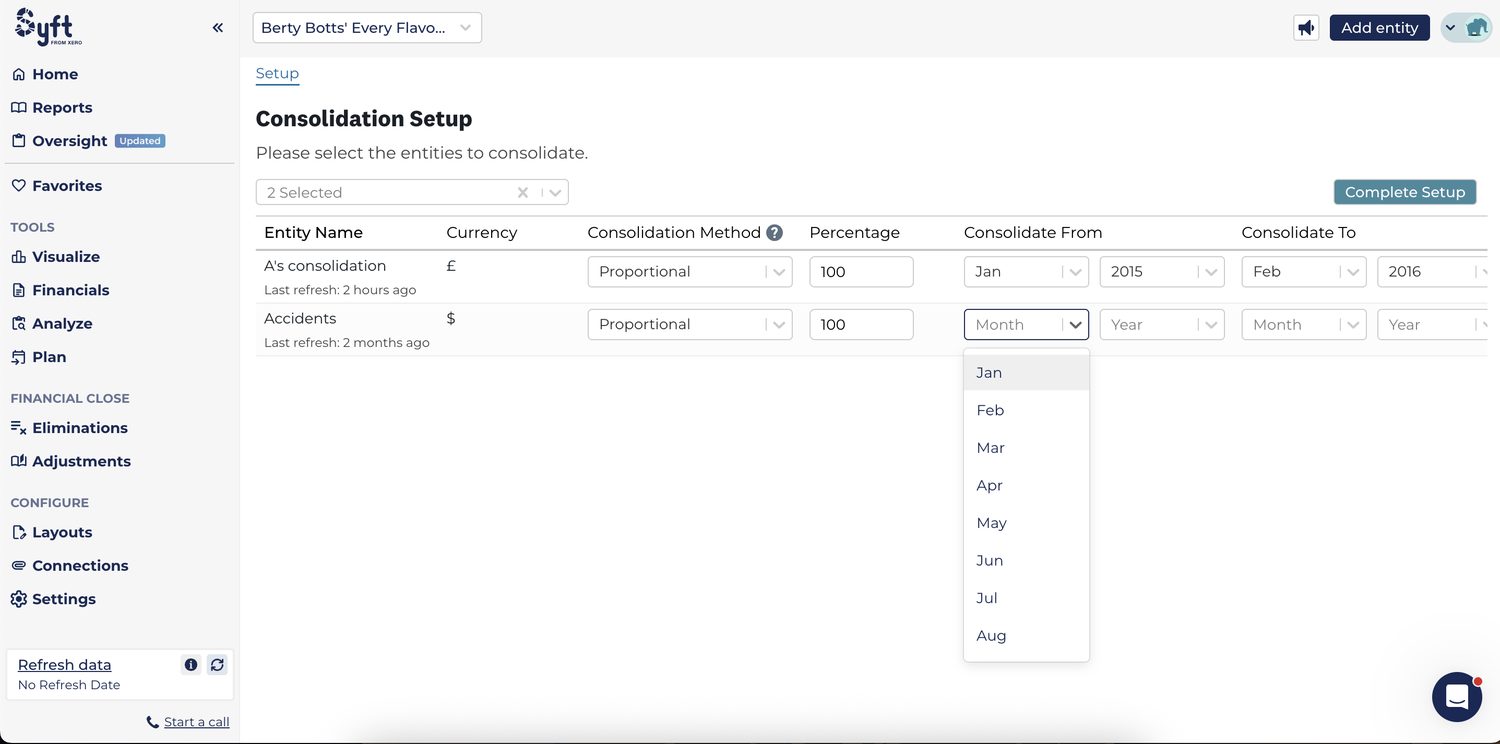
Screenshot: consolidation setup in Syft, now a Xero product, which we use for group reporting. Two entities in different currencies, each with its own consolidation method and ownership percentage, combined into one set of figures. Shown with demo data. Syft is a Xero product; this is not Logiframe software.
How much volume Xero handles
More than most people assume. Xero’s own published system limits state that it is designed for up to 5,000 sales invoices and 5,000 purchase bills a month, plus 5,000 bank transactions a month, with a recommended ceiling of 4,000 tracked inventory items, 10,000 contacts and 500 fixed assets. Xero notes these depend on how evenly transactions fall through the month and how variable the amounts are.
For context, that is roughly 15,000 accounting transactions a month before you are near the invoicing and banking guidance. Most businesses that believe they have outgrown Xero have not.
Complexity usually reaches the edge before volume does. A consulting firm issuing a few hundred invoices a month will never trouble those numbers. A high-order-count e-commerce or distribution business can pass them quickly, and the usual answer is not a different ledger but summarising at the source, so a sales or inventory system posts daily totals into Xero rather than every individual line. That is a design decision we make with clients regularly.
Where a business has genuinely outgrown small business accounting software, or needs statutory reporting formats no reporting layer produces, we will say so. We have implemented enterprise systems as well, so we can tell you plainly rather than sell you the wrong thing.
Strengths
Where Xero Is Genuinely Strong
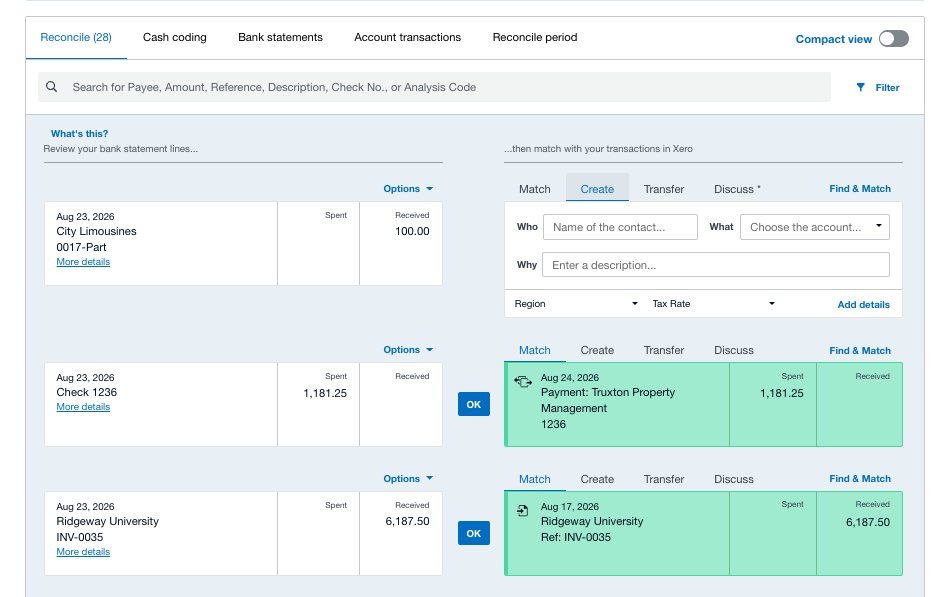
Bank feeds and reconciliation. The reconcile screen is the best in its class. Matching is fast, rules handle the repetitive cases, and the reconciliation reporting is honest about what has not tied.
The app ecosystem. Hundreds of connected apps, and more importantly a stable API that means the good ones work properly rather than approximately.
Multi-currency. Realised and unrealised gains handled natively, revaluation at period end, and reporting in your base currency without manual conversion.
Management reporting and consolidation. Through Syft, now a Xero product, Xero consolidates across entities and currencies, runs eliminations and adjustments at close, and produces a management pack that is built once and generated every month. This used to be the clearest reason a growing group left Xero. It is not any more.
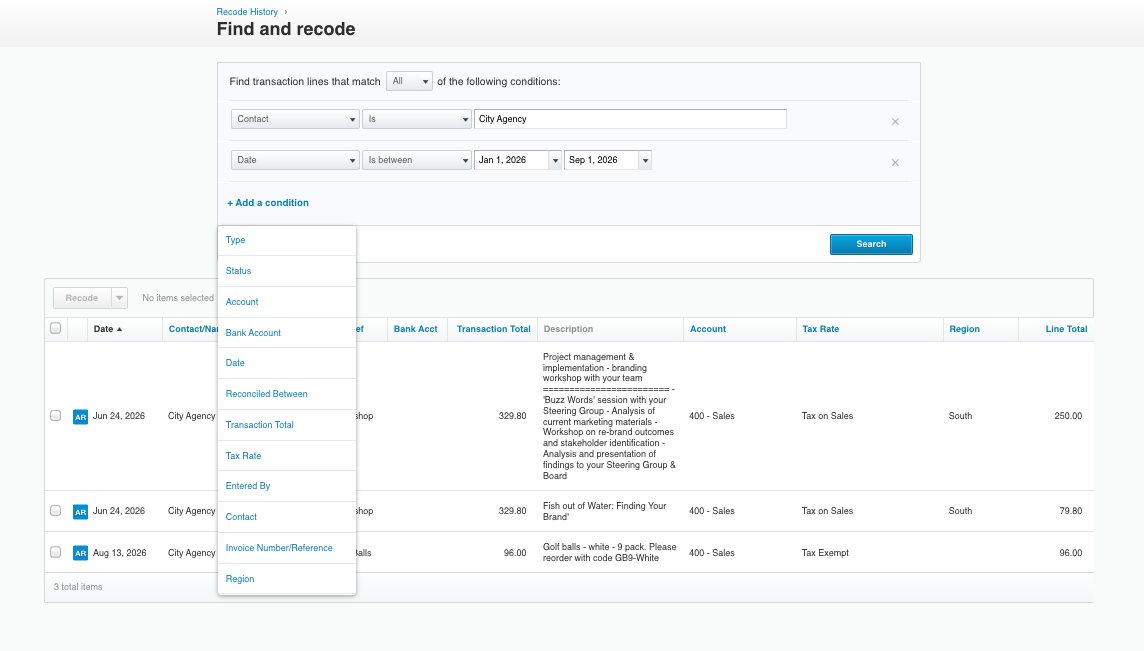
Advisor tooling. Find and recode, bulk reclassification, and advisor-level access make cleanup and review dramatically faster than in most competitors.
Lock dates. Two of them, one for users and one for advisors, which is the closest thing small business software offers to a real period close.
Unlimited users. Pricing is per organisation, not per seat, so adding your CPA or a reviewer costs nothing.
Screenshot: the reconcile screen, the feature Xero does best, shown with Xero’s own demo company data. This is Xero software, not a Logiframe product, and the figures are illustrative. Xero is a trademark of Xero Limited.Screenshot: Find and recode, an advisor-only tool that reclassifies hundreds of transactions in one pass. Shown with Xero’s own demo company data. This is Xero software, not a Logiframe product, and the figures are illustrative. Xero is a trademark of Xero Limited.
The comparison everyone asks for
Xero and QuickBooks
In the US, QuickBooks Online is the most widely used and Xero is the main alternative. Both are capable. The differences that actually decide it are narrower than the marketing on either side suggests.
Xero tends to win on reconciliation workflow, multi-currency, unlimited users and the quality of its advisor tools. QuickBooks tends to win on US market depth: more bookkeepers know it, more niche apps connect to it, and more CPAs will accept a file without comment.
The deciding question is usually not which is better but who will be working in it. Software your team and your advisors already know beats a marginally better system nobody is fluent in.
At list price they are close, and the comparison shifts with promotions. The real difference is that Xero charges per organisation with unlimited users, while QuickBooks charges by plan tier with user limits. If several people need access, Xero usually costs less in practice.
Can Xero handle multiple companies?
Each entity is a separate Xero organisation with its own subscription. You can switch between them from one login, and consolidate group reporting through Syft, now a Xero product. There is no single file holding several companies.
Does Xero do payroll in the US?
Not as a built-in module. US payroll runs through a connected app such as Gusto, which posts back into Xero. That works well, but it is a separate service with its own cost, and we do not run payroll ourselves.
Will my CPA accept Xero?
Almost always. If they have not used it, they can be added as a user at no cost and given advisor access at year end. Worth asking before you migrate rather than after.
How long does moving to Xero take?
For a simple business with clean records, a few weeks. The variable is not the software, it is the state of what you are migrating from. If prior periods need cleanup first, that is the longer part of the job.
Not sure Xero is right for you?
Tell us what your business does and how your books are kept now. If Xero is the wrong answer, we will say so, and tell you what we would use instead.