
Industries

You finish the job. Systems do the paperwork, AI does the answers.

In most service businesses the person who does the work is also the person who quotes it, invoices it, chases it and codes it. The admin happens in the evening, because that is the only time left. Most of it does not need to happen at all: the software you already pay for can do a large share of it, and almost nobody has switched it on.

An electrician working inside a control panel.

The structure

Two Systems, One Business

Most service businesses end up running two systems without ever deciding to. The job system arrives first, because scheduling and invoicing on site is the daily pain. The accounting follows behind it, and nobody ever sits down and decides how the two should relate.

The job system holds the work. ServiceM8 in most of the businesses we see, and in plenty of others a diary, a whiteboard and a group chat. The call, the schedule, the quote, the materials added on site, the photos, the invoice raised in the van. It is the record of what happened.

Xero holds the business. Profit and loss, bank accounts, supplier bills, payroll, the balance sheet. It is the record of what the business is.

Both are right about their own half, and neither is wrong. The problem is that the question every owner actually asks sits across both of them: did that job make money, and are we pricing the next one properly. No integration answers that by itself, whichever systems you run.

The real constraint

The Bottleneck Is the Owner

In a business this shape, admin does not compete with other admin. It competes with billable hours, and with the evening. That is why it slips, and why the answer is almost never to try harder at it.

Three layers can carry that load, and most businesses are paying for all three while using the first.

What the job system already does

Quotes and invoices raised on site rather than at the kitchen table, and payment taken before the van leaves. Recurring maintenance jobs and their invoices generated on a schedule. ServiceM8 also offers AI drafting for the parts that eat the most time: a job description and its billing items written from what was done, client emails and texts drafted in seconds, and a voice assistant to action tasks and answer questions without stopping to type.

What the ledger already does

Bills captured from a photograph and read into the system rather than retyped. Bank rules coding the fuel, the trade counter and the phone bill without anyone looking at them, learning from what you have coded before. Reminders chasing overdue invoices under your own name on your own timing. None of this costs extra on the plans most businesses already hold, and it is the subject of one of our guides on what Xero already automates.

What AI adds on top

The newest layer is not another app. It is being able to ask the ledger a question in a sentence and get an answer, instead of building a report or opening the laptop at nine at night to find out. That is covered further down, along with the two things it will not do for you.

What none of these layers answers is whether the work is priced properly. That takes a different kind of setup, and it is the rest of this page.

A worked example

ServiceM8 and Xero: What Syncs, and What Does Not

Take the most common pairing we see as the worked example. The ServiceM8 and Xero integration is genuinely good, and it is worth being precise about what it covers, because what it leaves out is the interesting part, and the same gap exists in every other pairing we have looked at.

Invoices approved in ServiceM8 are raised in Xero ready for reconciliation. Clients and items sync in both directions, with a change in one updating the other, and items held in Xero arrive in ServiceM8 as materials. Payments taken on the job sync to Xero, and payments received in Xero sync back. Tax rates and income account codes are pulled from Xero, so coding is consistent without anyone maintaining two lists.

Two details are worth knowing. Clients and materials created in ServiceM8 only reach Xero attached to an approved invoice, so an unapproved job is invisible to the ledger. And sending staff shift times through as timesheets is available in Australia only, so a US business is running payroll separately whatever else is connected.

How ServiceM8 and Xero fit togetherServiceM8 holds jobs, scheduling, quotes, materials used and labour on site. Approved invoices, clients, items and payments sync to Xero. Supplier bills, materials purchased and payroll do not sync and reach the ledger separately, which is why job cost has to be assembled deliberately.Job managementHOLDSJobs, scheduling, dispatchQuotes and job documentationMaterials added on siteLabour and time on the jobWhat the job earnedInvoice raised and approved on siteGeneral ledgerHOLDSProfit and loss, balance sheetBank and card accountsSupplier bills and purchasesPayroll journalWhat the business earnedRevenue, but not job-level costSYNCSDOES NOTCost does not travel with the jobSupplier bills, trade counter purchases, van stock and payroll reach the ledger separatelyand have to be attributed back to the job deliberately
What the integration carries, and what it does not. The solid line is revenue: invoices, payments, clients and items. The dashed line is the one that matters for margin, because supplier bills, trade counter purchases, van stock and payroll all reach the ledger by another route and have to be attributed back to the job deliberately.

The core problem

Why Job Margin Lies

Revenue arrives in the ledger job by job. Cost arrives by supplier, by pay run, and by card statement. Nothing in either system joins them back together unless somebody sets it up.
  • Materials are expensed when bought, not when used. A trade counter run on Tuesday hits the month it was bought, whether the job it was for finishes that week or next quarter. Monthly margin then swings on purchasing timing rather than on how the work went.
  • Van stock is invisible. Fittings, cable and consumables carried on the van were bought weeks ago and get used across a dozen jobs. Unless they are drawn down against jobs, every one of those jobs looks more profitable than it was.
  • Labour cost never reaches the job. Payroll posts as a lump to wages. The hours sit in the job system. Without an allocation, the most expensive input in the business is missing from every job margin you look at.
  • Travel and callbacks are free, apparently. Drive time between jobs and the return visit to fix something are real hours that rarely appear anywhere near the job they belong to.
  • Subcontractors get coded to one expense line. Which makes them invisible per job and awkward at year end when the 1099s have to be produced.
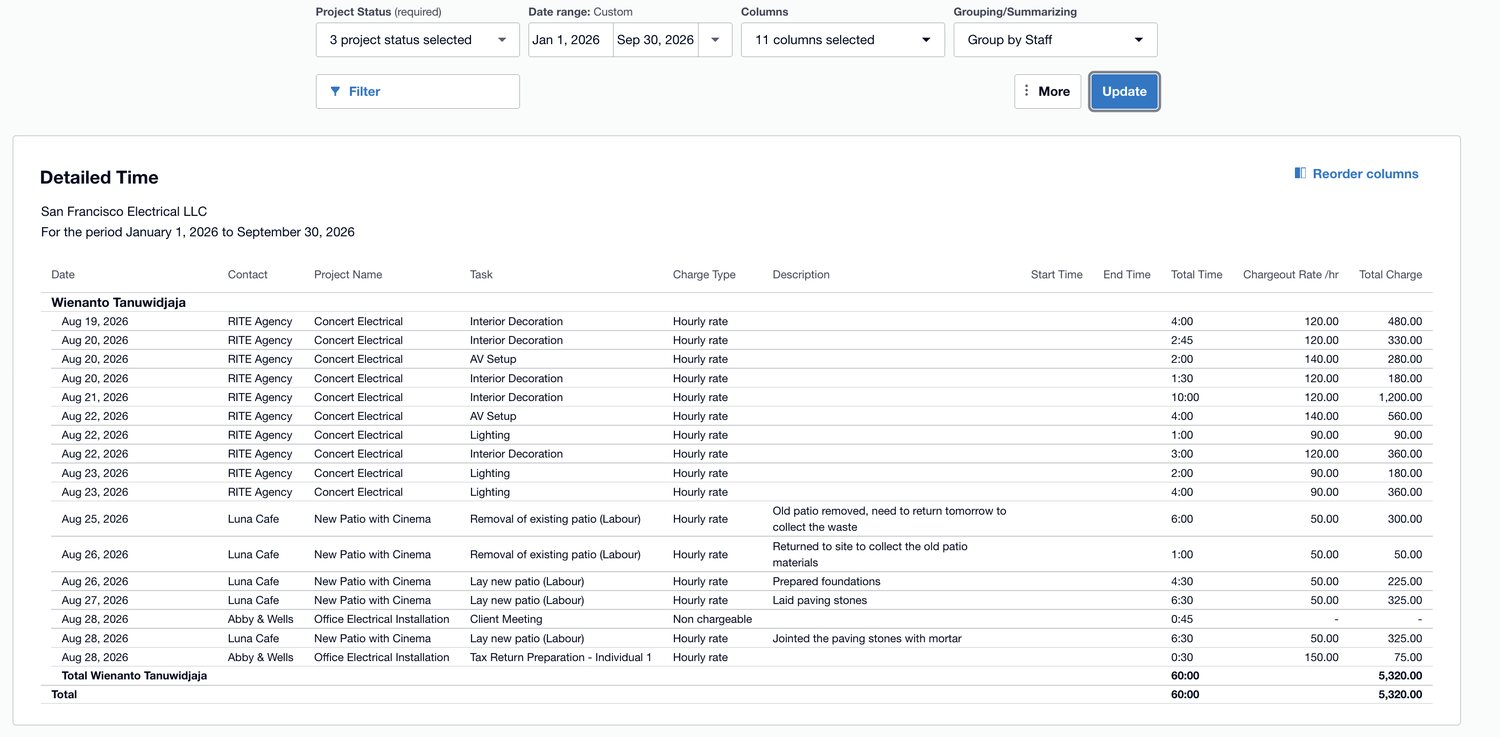
A detailed time report in Xero, grouped by staff, listing each time entry against a project and task with a chargeout rate and total charge.
Screenshot: a detailed time report in Xero, shown with demo data. Hours recorded against the project and the task, which is exactly the raw material job margin needs. Two things to notice. Every line carries a chargeout rate, which is what the hour was sold for, not what it cost you, so margin needs a cost rate set against it. And the non-chargeable line, forty-five minutes on a client meeting at nothing, is the kind of time that is real, unpaid, and usually invisible in the accounts. This is Xero software, not a Logiframe product, and the figures are illustrative. Xero is a trademark of Xero Limited.

The fix is not more software. It is deciding how cost gets attributed, and then doing it every month: materials posted to jobs rather than to a single materials account, a labour rate applied from recorded hours, and van stock treated as inventory drawn down rather than as an expense on the day of purchase.
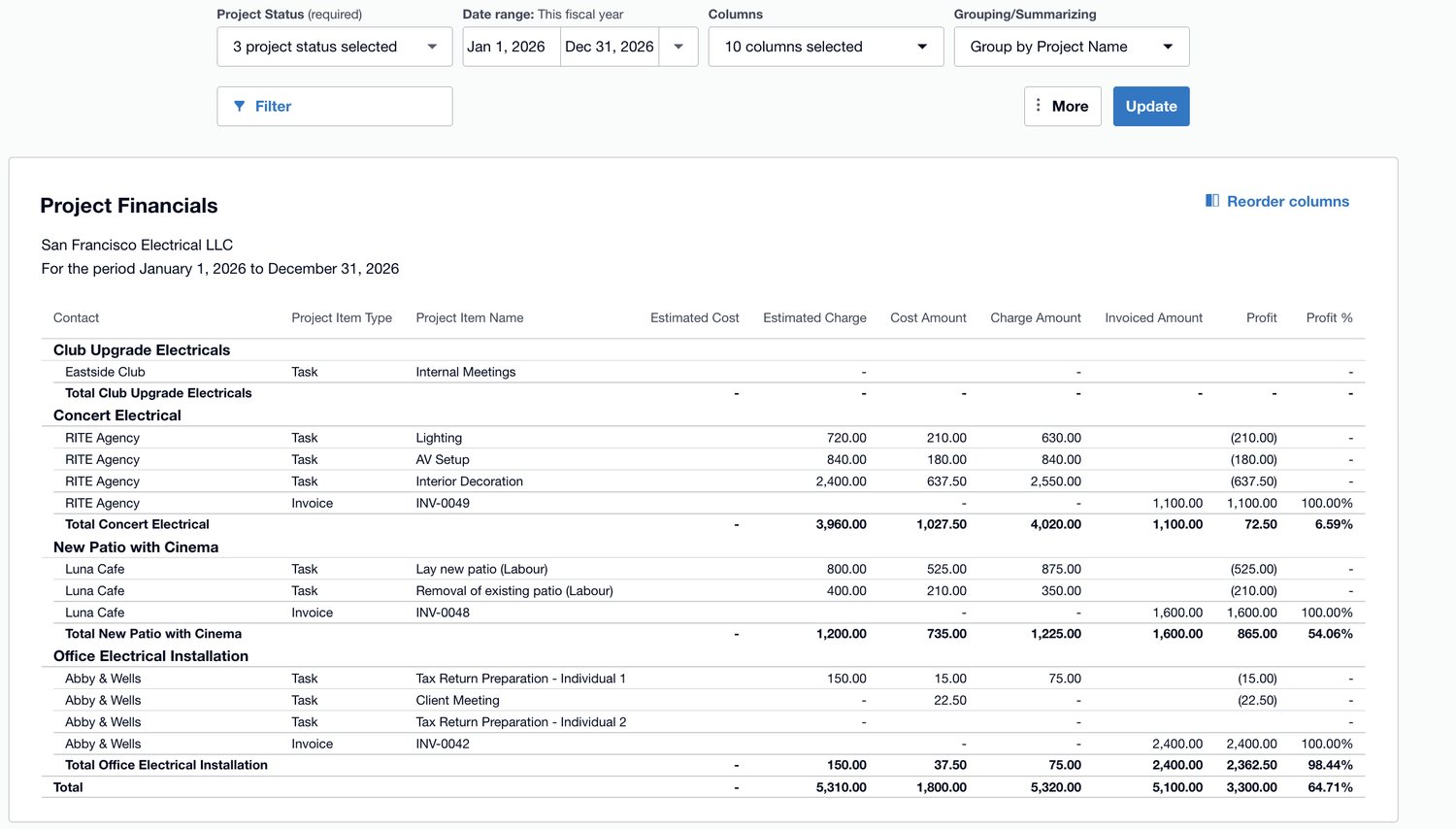
A project financials report in Xero grouped by project, with columns for cost amount, charge amount, invoiced amount, profit and profit percentage.
Screenshot: the same file once cost sits against the work, shown with demo data. Cost, charge, invoiced and profit by job, and the column that changes conversations is the last one. One job at 54 percent, another at 6.6, in the same business in the same year. Read it carefully though: profit here compares what has been invoiced against cost incurred, so a job that is part way through and not yet fully billed will look worse than it is. This is Xero software, not a Logiframe product, and the figures are illustrative. Xero is a trademark of Xero Limited.

Cash

Deposits, Card Payments and the Clearing Account

Taking a deposit when a quote is accepted is good for cash flow and slightly awkward in the accounts, because the money arrives before the work does. Through ServiceM8 Pay, a deposit syncs to Xero as a prepayment credit against the client, which is the right treatment: it is money held, not revenue earned, until the job is done.

Two configuration details decide whether that works cleanly. The default account for payments has to be set to a bank account for deposits to sync as prepayments at all. And if auto-reconciliation of ServiceM8 Pay transactions is switched on, the ServiceM8 Pay clearing account needs to be a bank account too.
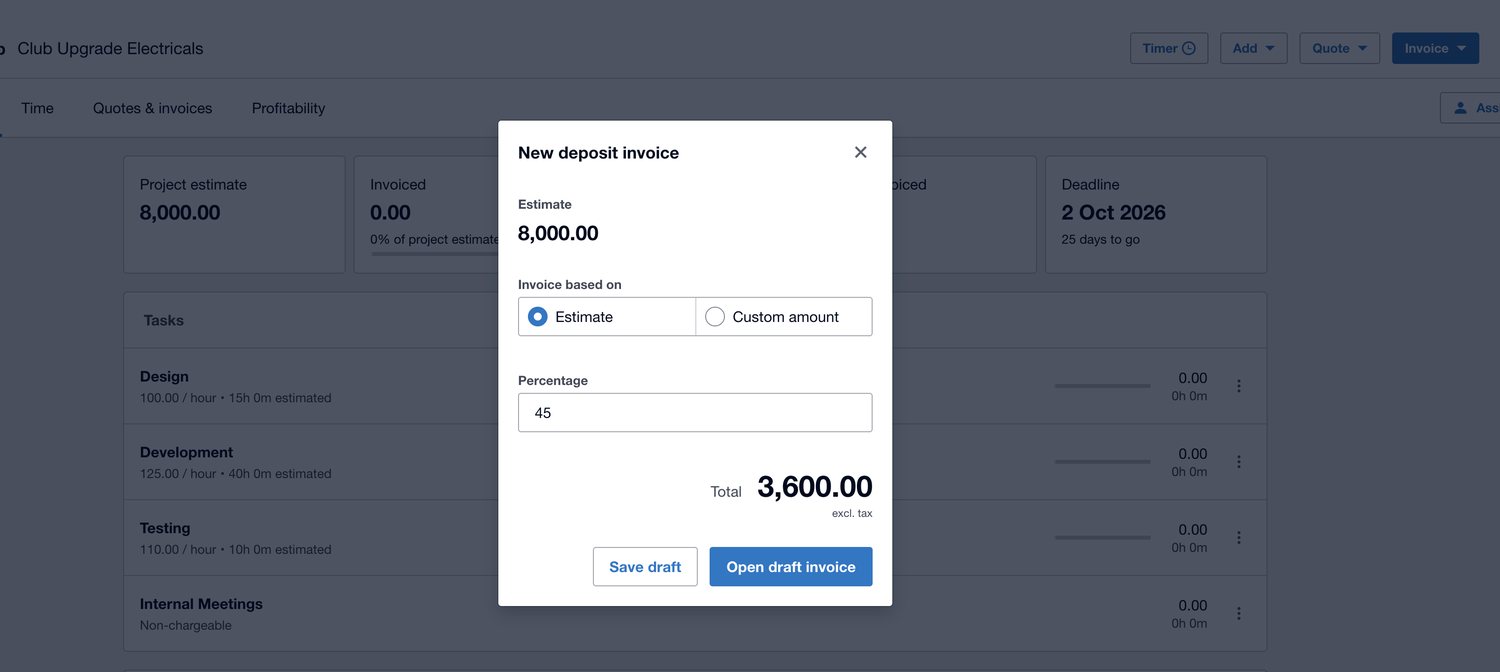
A new deposit invoice dialog in Xero, taking 45 percent of an 8,000 project estimate to give a deposit total of 3,600.
Screenshot: raising a deposit invoice against a project in Xero, shown with demo data. Forty-five percent of an eight thousand estimate, before any of the work has been done. Worth understanding what this is: a deposit invoice is an invoice, so it lands wherever its account code sends it. Coded to income it becomes revenue in a month the work did not happen. Coded to a liability it sits as money held until the job earns it, which is what it actually is. Neither is a mistake in the software; it is a decision somebody has to make once and then apply consistently. This is Xero software, not a Logiframe product, and the figures are illustrative. Xero is a trademark of Xero Limited.

Then check it monthly

A payments clearing account is doing its job when it returns to zero. If yours has been growing since the day card payments were switched on, that balance is the accumulated difference between what the app recorded and what the processor actually deposited, usually fees. It is the cheapest early warning you have that the two systems have drifted apart.

The newer layer

Where AI Actually Saves You Time

The honest version, because there is a lot of noise about this. AI will not keep your books for you, and anyone saying otherwise is selling something. What it does is take real time out of the week: drafting the writing, reading the documents, and shortening the distance between a question in your head and an answer out of your ledger.

Xero ships this directly today. Its assistant, JAX, is available inside Xero and answers within the permissions the user already has. Alongside it, Xero has built an integration with Anthropic’s Claude that puts live ledger data into a tool you can simply ask questions of. That is the one we use and the one shown below, and it is read-only: it can read your books and answer from them, but it cannot change anything in them.

What that looks like on a Tuesday: asking which invoices are more than thirty days overdue and what they total, or what you spent at a particular supplier last quarter, in a sentence rather than by building a report. Combined with the drafting and capture described above, an evening of admin becomes a few minutes between jobs, which is the version of this worth caring about.
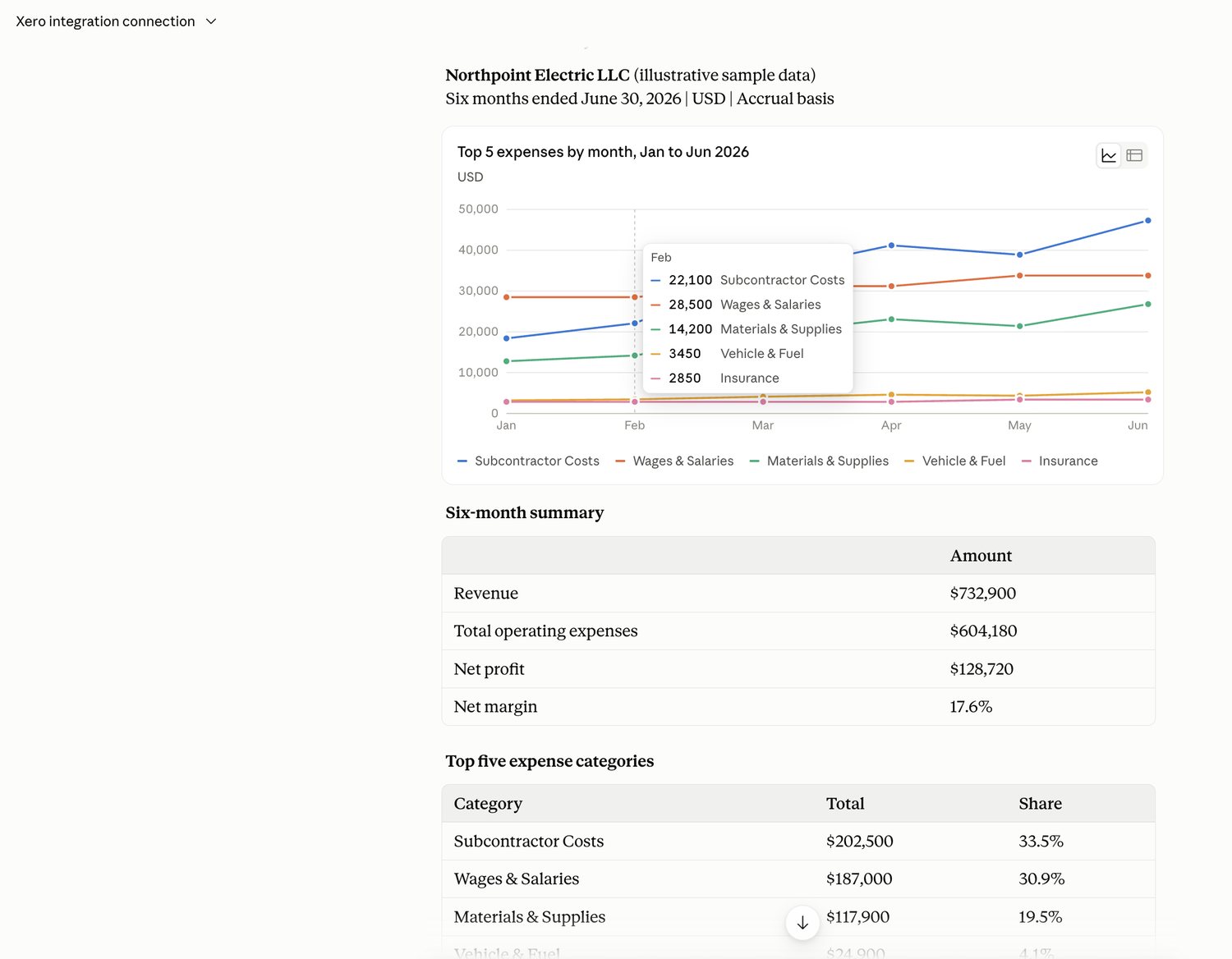
Claude connected to Xero, showing a chart of the top five expense categories by month for an electrical contractor, with a six-month summary of revenue, operating expenses, net profit and net margin.
Screenshot: Claude connected to a Xero organisation, shown with illustrative sample data for an electrical contractor. The question behind it was an ordinary one, where the money went over six months, and the answer came back as a chart and a summary rather than a report somebody had to build. Note the line at the foot of the screen: the assistant can make mistakes, and the numbers it returns are only as good as the ledger underneath. That is the part we are accountable for. Claude is a product of Anthropic and Xero is a trademark of Xero Limited; neither is a Logiframe product.

Two limits worth holding on to

An answer is only as good as the file it is drawn from. An assistant reading an unreconciled ledger will give you confident answers built on numbers that do not agree with the bank, and it has no way of telling you so. And a connection to your accounting data is a connection like any other: worth knowing who authorised it, what access it was granted, and how you would revoke it. We cover both on the integration page.

The failure modes

Where It Actually Goes Wrong

  • Jobs completed but never approved. The work is done, the customer thinks they have been invoiced, and nothing reached the ledger because nobody pressed approve. Revenue and receivables are both understated until someone notices.
  • The same customer, twice. Created once in the field and once in the office, so the receivables ledger splits one client across two contacts and the aging looks wrong.
  • Cash and card jobs recorded on the phone but not in the books. The bank feed shows a deposit with no invoice behind it, and it gets coded to sales as a plug.
  • Supplier bills entered without a job reference. Once that habit sets in, job costing cannot be rebuilt later without going back through the invoices by hand.
  • Warranty callbacks billed at zero. Which is correct commercially and misleading in the accounts, because the labour and materials still cost you and belong against the original job.

Boundaries

What We Do, and What We Do Not

We do

  • Keep the ledger reconciled and the close on a date
  • Post the journals that put materials and labour against jobs
  • Reconcile the ServiceM8 Pay clearing account every month
  • Chase the unapproved jobs before they become missing revenue
  • Produce job and crew profitability alongside the financials

We do not

  • Run your payroll. It runs in a payroll system and reaches the ledger as a journal we reconcile
  • Prepare or file tax returns, including your 1099 filings
  • Hold signing authority or release payments to suppliers
  • Price your jobs. We will tell you what the last hundred actually earned
  • Advise on licensing, insurance or contract terms

Questions

Questions Trades Businesses Ask

Does the ServiceM8 and Xero integration give me job profitability?
Not on its own. It carries invoices, payments, clients and items, which is the revenue side of a job. Materials purchased, van stock, labour cost and subcontractors reach the ledger by other routes, so job cost has to be attributed deliberately. Once that is set up it is a monthly routine rather than a project.
Can ServiceM8 send our staff hours to payroll?
Timesheets to Xero are available in Australia only, so a US business runs payroll separately whatever else is connected. The hours are still useful: they are the basis for putting labour cost against jobs, which is what makes margin real.
We take deposits on quotes. Is that revenue?
No. A deposit is money held until the work is done, and through ServiceM8 Pay it syncs to Xero as a prepayment credit against the client rather than as income. Treating deposits as revenue overstates a good month and leaves you with a liability nobody has recorded.
We use a different job system. Does that change anything?
The principles are identical. The job system is authoritative for what happened on site, the ledger is authoritative for the business, and the seam between them is where the accounting work sits. What differs is exactly which fields cross that seam, so the first thing we do is establish what your integration actually carries before assuming anything.
Do we have to change accounting software to work with you?
No. Xero is where our depth is and most of what we publish is about it, but we work in QuickBooks Online as well. At this level the more useful question is whether job cost is being attributed at all, and that answer is the same on either platform.

Which of your last hundred jobs made money?

If the answer involves a spreadsheet and a guess, that is the gap. Tell us what you run and we will tell you what it would take to close it.

Book a free 30-minute call See the 32-point check