
Services
Monthly bookkeeping run entirely in Xero — closed, reviewed and proven every period by the team that does the work.
Bookkeeping packages

Xero health check
Before taking on a file, an advisor runs a set of checks that reveal its real condition in under an hour: usually finding things the business had no idea were there. These are those checks, where to look in Xero, what a healthy answer looks like, and what each warning sign actually means. You can run the whole thing yourself.
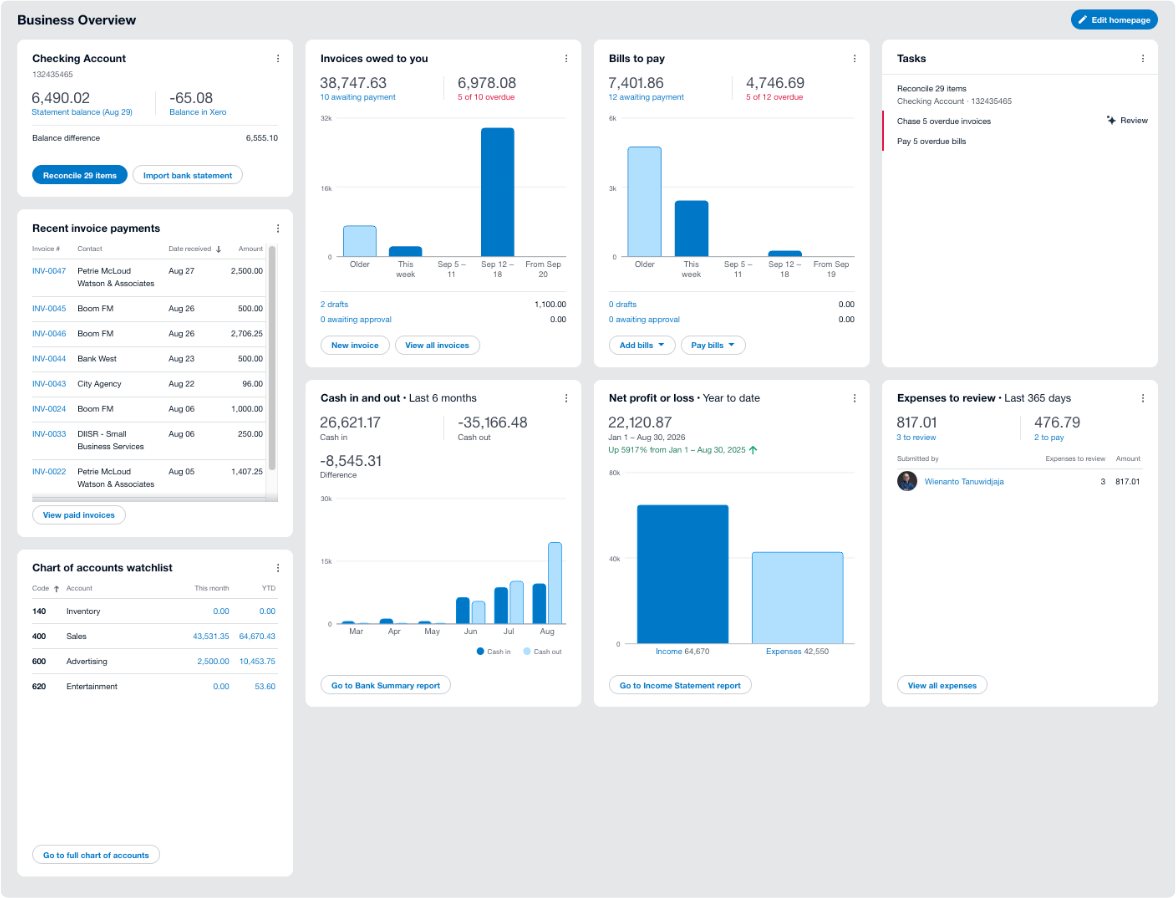
Purpose
A profit and loss tells you what your books say. A health check tells you whether your books can be believed, which is a different and more urgent question.
The distinction matters because a Xero file in poor condition doesn't announce itself. It produces reports that look entirely normal. The numbers are formatted correctly, the totals add up, and nothing on screen suggests that a bank feed stopped six months ago or that a suspense account has been quietly absorbing anything nobody understood since 2023. Problems surface later, at the worst possible moment: during due diligence, when a lender asks for something, or when a CPA starts year-end work and the questions begin.
A health check looks at the file the way an outsider would: testing whether each number can be traced to something real, whether the controls that should exist do, and whether the process producing the numbers is sound. Most of it is mechanical. The value is in doing it deliberately rather than assuming.
Timing
Annually at minimum. But six situations make it urgent, and in each the cost of not knowing is much higher than the hour it takes.
Lenders and investors will find what you didn't. Discovering it during diligence costs you leverage and sometimes the deal itself.
Both directions. Check the file when someone leaves, and check it before someone new inherits problems they'll be blamed for.
Issues found in October cost a fraction of the same issues found by your CPA in March under filing pressure.
A new entity, a new revenue line, a first employee or a new sales channel usually outgrows the setup that preceded it.
If margin swings without an operational reason, or cash doesn't match what the P&L implies, trust that instinct. It's usually right.
Knowing the file's real condition is how you get an accurate quote instead of a cheap one that expands later.
The health check
Work through these in order. Several need advisor-level access. If you don't have it, your accountant or bookkeeper does, and these are reasonable things to ask them to run.
For each check: where to look, what healthy looks like, and what a warning sign means. Don't skip the boring ones; the mundane checks catch more than the sophisticated ones.
If these are wrong, everything built on top of them is wrong too, and no amount of careful monthly work will fix it.
| Check | Where to look | Healthy | Warning sign |
|---|---|---|---|
| 1. Conversion balances | Advanced settings, conversion balances | Agree to the closing trial balance from your prior system or accountant | Nobody knows where they came from, or they don't balance |
| 2. Financial settings | Advanced settings, financial settings | Correct year end, correct tax basis, sensible defaults | Year end left at the default and never checked |
| 3. Chart of accounts size | Chart of accounts | Every account is used, and each has a distinct purpose | Near-duplicate accounts, or dozens of accounts with no activity |
| 4. Account types and reporting codes | Chart of accounts | Accounts sit in the right section of the P&L and balance sheet | Costs of sale classified as overheads, or assets sitting in expenses |
| 5. Lock dates set | Advanced settings, financial settings | Reporting period lock date current; end of year lock date on filed periods | Both empty: prior periods are fully editable by anyone |
The most common source of serious problems, and the easiest area to be misled by a screen that looks finished.
| Check | Where to look | Healthy | Warning sign |
|---|---|---|---|
| 6. Every account balance agrees to its statement | Bank Reconciliation Summary report vs bank statements | Agrees at each month end, with differences explained by timing | Any unexplained difference, however small |
| 7. Feeds are live | Dashboard; check the latest transaction date per account | Every account has recent transactions | An account whose most recent entry is weeks or months old |
| 8. Reconcile queue depth | Bank accounts screen | Near zero, cleared at least weekly | Hundreds of items, or items older than a month |
| 9. Manually reconciled transactions | Assurance dashboard, bank accounts tab (advisor) | Few or none, each explainable | A pattern of items marked as reconciled rather than matched |
| 10. Deleted statement lines | Assurance dashboard, bank accounts tab (advisor) | None, or documented reasons | Deleted lines: real bank activity removed from the record |
| 11. All accounts actually in Xero | Compare Xero accounts to your bank and card list | Every business account and card is connected | An account or card operating outside Xero entirely |
These checks are quick and catch structural errors nothing else will surface.
| Check | Where to look | Healthy | Warning sign |
|---|---|---|---|
| 12. Aged payables ties to the control account | Aged Payables Detail vs Balance Sheet | Figures agree exactly | A difference: usually a journal posted directly to the control account |
| 13. Aged receivables ties to the control account | Aged Receivables Detail vs Balance Sheet | Figures agree exactly | A difference, or unallocated credits sitting on customer accounts |
| 14. Suspense and clearing accounts | Trial Balance | Zero | Any balance: transactions are missing from where they belong |
| 15. "Ask My Accountant" account | Trial Balance | Zero, or the account is archived | A balance carried for months: a queue nobody is working |
| 16. Very old aged items | Aged Payables and Aged Receivables | Nothing beyond terms without a documented reason | Items over 120 days nobody can explain: often duplicates or unapplied credits |
Where reports go quietly wrong. Everything here still reconciles perfectly while telling you the wrong thing.
| Check | Where to look | Healthy | Warning sign |
|---|---|---|---|
| 17. Transfers coded as transfers | Account Transactions for revenue and expense accounts | Movements between your own accounts appear as transfers | Transfers as income in one account and expense in another: inflating both |
| 18. Card payments not treated as expenses | Account Transactions for the card liability | Payments to the card issuer reduce the liability | Card payments coded to expenses: every purchase counted twice |
| 19. Bank rule output | Transaction report per account receiving auto-applied rules | Everything captured belongs where the rule put it | A rule too broad, coding unrelated transactions consistently and wrongly |
| 20. Tax rates applied consistently | Find & Recode search by tax rate (advisor) | Consistent treatment within each account | The same expense type carrying different tax rates over time |
| 21. Tracking categories used consistently | Reports filtered by tracking category | All relevant transactions carry a category | A large unassigned bucket, making segment reporting meaningless |
Owners read the P&L. Long-running errors live on the balance sheet, which is why they run so long.
| Check | Where to look | Healthy | Warning sign |
|---|---|---|---|
| 22. Every balance is explainable | Balance Sheet, line by line | You can say what each balance represents and evidence it | Any line you can't explain: start there, that's your worst problem |
| 23. Depreciation is current | Fixed asset register | Assets registered, depreciation run to the current period | Assets at original cost, or a register nobody has updated |
| 24. Negative balances | Balance Sheet and Trial Balance | None where they don't make sense | Negative bank, negative inventory, or negative payables |
| 25. Payroll liabilities clear | Balance Sheet payroll accounts | Clear as payments are made, leaving only current amounts | A growing balance, meaning payments aren't matched to the liability |
| 26. Round-number balances | Trial Balance | Balances are the sum of real transactions | Suspiciously round figures: usually a plug posted to force agreement |
Almost never reviewed, and the checks most likely to surprise you.
| Check | Where to look | Healthy | Warning sign |
|---|---|---|---|
| 27. Who has access | Users; assurance dashboard user activity (advisor) | Every user is current and needed | Former staff or a previous bookkeeper still holding access |
| 28. Who has advisor access | Users | Only those who genuinely need it | Advisor rights given broadly. That's who can change lock dates |
| 29. Duplicate supplier bank details | Assurance dashboard, contacts tab (advisor) | No duplicates; no unexplained recent changes | Two suppliers sharing bank details, or details changed without a record |
| 30. Separation of duties | Your own process, not a Xero screen | Whoever reconciles can't also move money | One person entering, approving, paying and reconciling |
The last two, and both are quick.
| Check | Where to look | Healthy | Warning sign |
|---|---|---|---|
| 31. Connected apps | Connected apps list | Every connection is in use and syncing correctly | Abandoned connections still holding access, or a sync creating duplicates |
| 32. Reports published at close | Published reports | A published set for each closed period | Nothing published: no record of what was reported when |
Urgent
Most warning signs can wait for a planned cleanup. These can't: each one means either that money may be moving without oversight, or that numbers already relied on are wrong.
Real bank activity removed from the record. There is no legitimate routine reason for this, and it means the file no longer reflects what happened at the bank.
The classic payables fraud signature. It has innocent explanations: a duplicate record, a genuine parent company, but it needs checking today, not next quarter.
Access should end when the relationship does. This is also an access-control failure that a lender or insurer would take seriously.
Every report since is missing transactions, and every decision made from those reports was made on incomplete information.
Entering, approving, paying and reconciling in one pair of hands isn't an accusation about anyone. It's an unmonitored opportunity, and it's what fraud examinations find afterwards.
If a significant balance sheet line has no explanation, the reports built on it are unreliable: including anything already given to a bank, board or investor.
Results
Count the checks that came back healthy. The bands below aren't precise, but they map reliably to what the file actually needs next.
The file is in good shape. Fix the individual exceptions, make sure lock dates are being set monthly, and re-run this annually.
The common pattern. Recording is happening, proving isn't. A focused clean-up plus a defined monthly routine resolves most of it.
Don't start a monthly routine yet: it will just document the problem regularly. Catch up and clean up first, then establish the cadence.
Where to go next. Failures in banking point to reconciliation. Coding and control account failures point to catch-up and clean-up. Missing lock dates and unpublished reports point to month-end close. And if most areas are failing at once, the underlying issue is almost always that nobody owns the monthly routine: fix that first, or you'll be running this check again next year with similar results.
The hardest checks to run on your own file are the ones about coding judgment: whether an expense is in the right account, whether a balance is genuinely explainable. It's difficult to spot an error you made yourself, because the reasoning that produced it still seems sound.
The mechanical checks here are reliable self-service. For the judgment ones, a second pair of eyes finds things you won't, which is the actual argument for having someone external run this periodically.
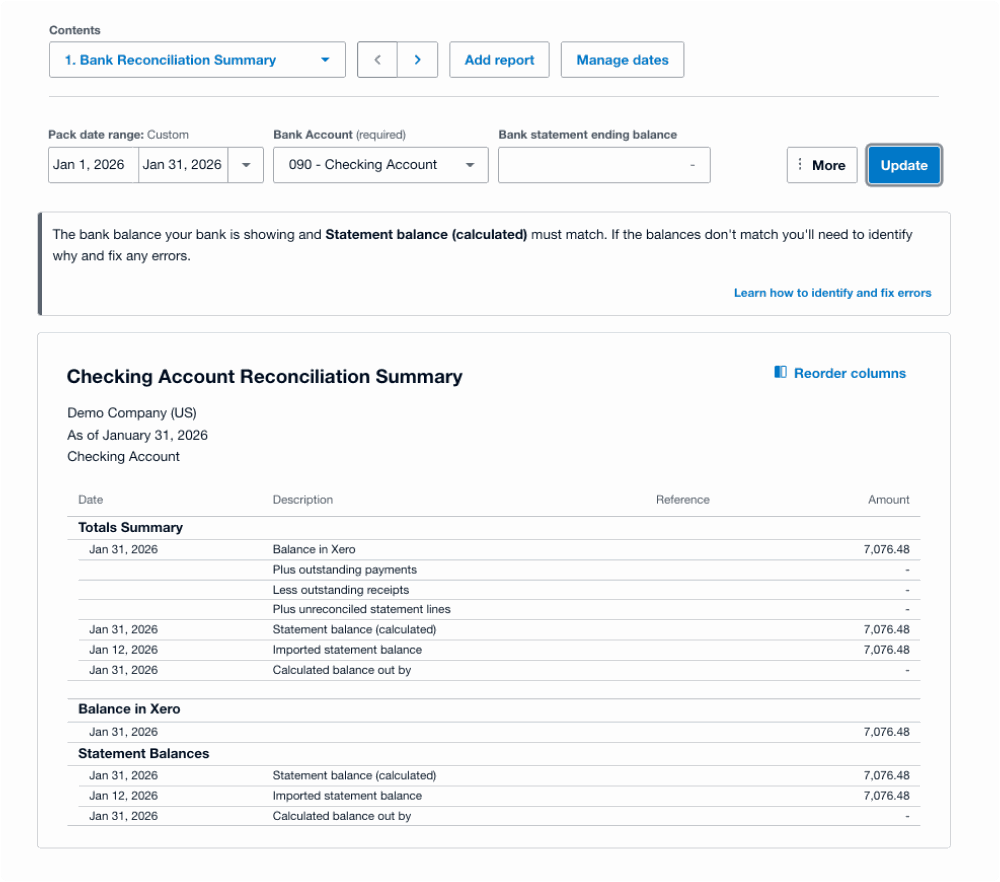
This is the single most useful report in a health check, and the one most business owners have never opened. It sits under Accounting, then Reports, then Bank Reconciliation Summary. It answers one question: does what Xero thinks you have in the bank agree with what the bank says you have?
Four lines carry the meaning:
In the example below, the account reconciles: the calculated and imported balances both read 7,076.48 and the out-by line is empty. That is what a healthy account looks like. What you are checking for on your own file is any figure on that last line, and any gap between the imported statement date and today.
Why this matters more now
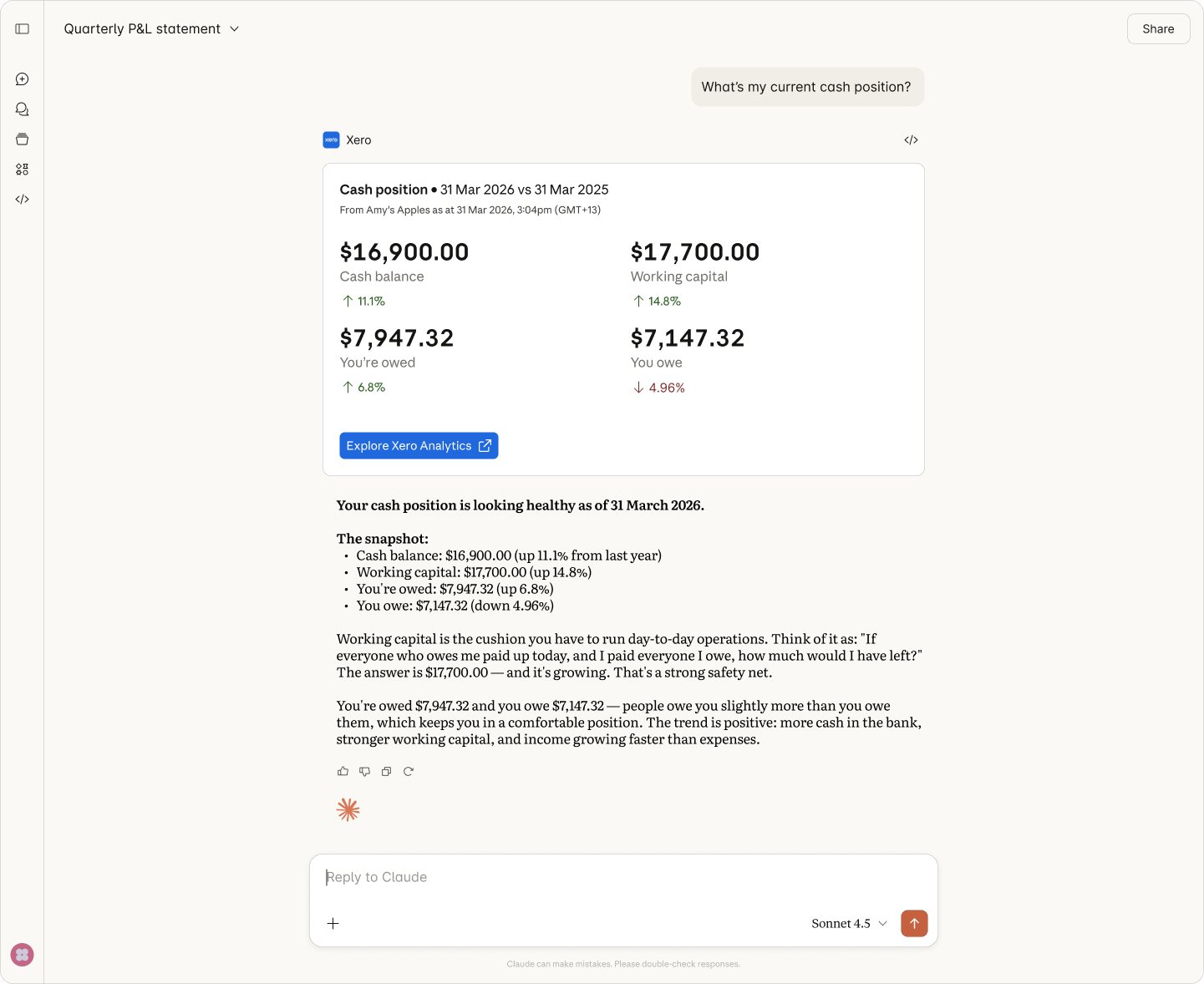
AI can answer questions from your books. It cannot tell you the books are wrong. Xero's Claude connector gives you a read-only link between your Xero organisation and Claude, so you can ask “what's my cash position?” or “who owes me money?” in plain English and get an answer from live data, with links back to the underlying report or invoice.
It is genuinely useful, and it is better at this than people expect. Ask it directly whether the bank reconciles or what is sitting in suspense, and it will tell you, because those figures are in the file. The limit is not detection. The limit is that it answers the question you asked, and knowing which question to ask is the part that requires already understanding what should be in the books. Someone who knows to ask whether the bank reconciles usually does not need to ask. Someone who does not know that question exists will never think to type it, and will get a confident answer about cash position that is built on an account nobody has tied out since March.
What it cannot see is what is not there. The invoice that was never entered does not appear as a gap. A bank statement you have not connected cannot be compared against. A prior period that shifted after you sent the numbers to your lender still reconciles internally, because the file has no memory of what you reported. And a transaction coded to a plausible but wrong account looks exactly like a correct one to anything reading the ledger. Those are judgment and evidence problems, not query problems.
That is the gap this health check is built to close. The checks above are the ones an advisor runs before trusting a number: comparing the file against external evidence, and asking the questions nobody thought to ask. Do them, and an AI answer stops being merely fast and becomes worth acting on.
Have us run it
Everything above is yours to run. Most people who work through it find two or three things they are not sure about, and a few they would rather someone else confirmed. That is what these are for.
Free
A live walk through your file with one of our team. We look at the things that show up fast: whether the bank reconciles, how far back the file is current, obvious coding problems, and whether closed periods are locked.
$750 flat, any file size
All 32 checks across the seven areas above, run by a Xero-certified accountant, including the ones that need advisor access. You get a written report, not a verbal summary.
The $750 is credited in full against onboarding if you engage us for ongoing bookkeeping within 60 days. If the check finds nothing worth fixing, we will tell you that too.
Fixing what the check finds is priced separately, and depends on how far back the work goes. Onboarding and prior-period cleanup starts at $2,500, and ongoing monthly bookkeeping starts at $399 a month. We will not quote either until the check tells us what is actually there.
Questions
A structured review of a Xero file's condition rather than its results. It tests whether the numbers can be relied on: whether bank and card balances agree to statements, whether control accounts tie to their subledgers, whether suspense accounts are clear, whether coding is consistent, whether every balance sheet line is explainable, who has access, and whether periods are being locked and reports published. It's the review an advisor runs before taking on a file, and it typically takes about an hour.
Mostly yes. The mechanical checks: balances against statements, control account tie-outs, suspense balances, feed currency, lock dates and user access, are all self-service, and they catch most problems. Several checks need advisor-level access, particularly the assurance dashboard items covering manually deleted statement lines, manually reconciled transactions and duplicate supplier bank details; if you don't have advisor rights, your accountant or bookkeeper does.
The checks that genuinely benefit from an outside reviewer are the judgment ones about coding accuracy, since it's difficult to spot an error you made yourself: the reasoning that produced it still seems reasonable.
Annually as a baseline. Sooner in six situations: before any funding or sale process, since lenders and investors will find what you didn't; whenever bookkeeping changes hands, in both directions; before year-end work begins, because issues found in advance cost far less than the same issues found under filing pressure; after the business changes shape, such as a new entity, revenue line or first employee; when the numbers feel wrong without an operational explanation; and before engaging a new bookkeeping provider, so the quote reflects the file's real condition.
Six findings warrant immediate attention. Deleted bank statement lines, which means real bank activity was removed from the record. Two suppliers sharing bank account details, the classic payables fraud signature. A former bookkeeper or ex-employee retaining access. A bank feed that stopped months ago, meaning every report since is incomplete. One person controlling entering, approving, paying and reconciling. And any material balance sheet line nobody can explain, which makes every report built on it unreliable.
Almost always because a journal was posted directly to the accounts payable control account rather than through a bill. The subledger: the aged payables report, only knows about bills, so a direct journal moves the control account without moving the subledger, and the two diverge permanently until corrected. The same applies to accounts receivable. Comparing the aged detail report to the balance sheet figure is a fast, high-value check, and any difference is a real error rather than a timing quirk.
That transactions are sitting somewhere other than where they belong, so every report affected by those transactions is wrong. Suspense, clearing and "Ask My Accountant" accounts are meant to be temporary queues cleared each month. A balance carried for months means the queue isn't being worked, and the longer it persists the harder it gets to resolve, because the documentation and the memory of what each item was both fade. The target balance is always zero.
Look at the most recent transaction date for each connected account. If an account's latest entry is weeks or months old while the account is still in use, the feed has stopped. Feeds can expire or require re-authorization and don't always announce it, which is why this is worth checking weekly rather than discovering at year end. Note also that a feed dropping out is invisible on the reconcile screen. If transactions were never delivered, they were never in the queue to be missed.
Yes. Advisor is the highest access level and carries the ability to set and remove lock dates, use bulk recoding tools, and change financial settings. Anyone with it can effectively reopen closed periods and alter historical transactions. It should be limited to people who genuinely need it, reviewed whenever someone leaves, and treated as a meaningful permission rather than a convenience. Review the full user list at the same time, since former staff and previous bookkeepers retaining access is common and rarely noticed.
Address anything on the urgent list first: access still held by former staff, deleted statement lines, duplicate supplier bank details, a stopped bank feed. Those either involve money moving without oversight or mean current reports are wrong.
After that, sequence rather than attacking everything at once: fix the chart of accounts if it's structurally wrong, complete any missing data, then correct coding, then clear suspense balances, then publish and lock. And identify why the file drifted, a cleanup that fixes data without addressing the cause buys about a year.
Substantially. Much of what a CPA charges for at year end is reconstruction: working out what transactions were, chasing missing documentation, resolving balances nobody can explain. A file that reconciles, ties out and locks each month arrives as something to review rather than something to rebuild. The same applies to any due diligence, clean books shorten the process and reduce the number of questions that turn into negotiating points.
Related
We run Xero health checks for startups, growing businesses and non-profits: including the checks that need advisor access and the judgment calls that are hard to make on your own work.