
HubSpot CRM implementation

HubSpot CRM implementation that fits how you sell.

Build a strong foundation for customer growth. We tailor each HubSpot CRM implementation to your sales process, so the move is smooth and the platform is useful from the first day.

The case for a CRM

Why Every Business Needs a CRM

Spreadsheets and inboxes work for a handful of customers. Past that point, a CRM keeps the whole team on the same record.

  • One central record. Instead of fragmented, unreliable data, every prospect's history is complete, accurate and available in one place.
  • Better-informed conversations. Sales reps can see who has already spoken to a prospect and what was discussed, so they know what to cover on the next call.
  • Consistent management. A CRM standardises how reps log activities and track interactions, which gives managers a reliable basis to coach and support the team.
  • Room to grow. Putting a CRM in place early avoids a painful catch-up later, when customer volume and team size have already grown.
HubSpot CRM screens showing contact records and a sales pipeline.
HubSpot CRM. This is HubSpot software, not a Logiframe product, and the data shown is illustrative.

Getting it right

Why a Planned HubSpot Implementation Matters for Growth

A CRM is the backbone of your customer operations, and setting it up is a turning point for the business.

A successful HubSpot CRM implementation is more than installing software. It aligns your data, teams and processes so they work together. A well-run setup makes adoption easier for users, keeps data accurate and gives you a platform configured for your sales, marketing and service goals. It also avoids the common mistakes that leave teams working around their CRM instead of in it.

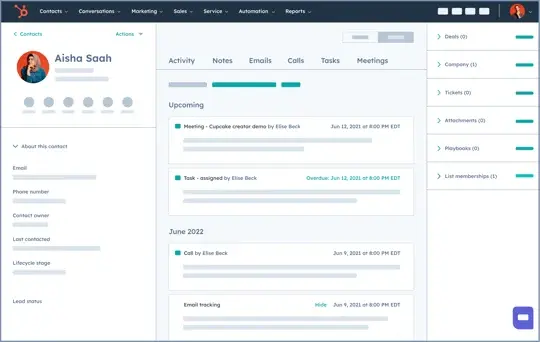
Overview of a HubSpot CRM record with contact details, activity timeline and associated deals.
A contact record in HubSpot CRM. This is HubSpot software, and the data shown is illustrative.

How we implement

Four Steps to a Successful CRM Implementation

Deploying a CRM well takes a planned approach. These are the four stages we work through with you.

Step 1

Align the CRM with your sales process

Adoption depends on the CRM supporting the way your team already sells. We define deal stages tied to trackable actions, add custom fields for your industry's data, and set clear rules for lead ownership and territory routing to prevent conflicts.

Step 2

Prepare and migrate data

We clean data before it moves, removing outdated and test contacts. We keep offline copies and migrate in sections, so any unexpected result is easy to find and nothing is lost.

Step 3

Optimise sales workflows and reporting

With the data in, we set up automated lead routing, notifications for high-value actions and custom lead views for prioritised outreach, plus reports that track individual and team activity against quota.

Step 4

Monitor systems and data continuously

As the business grows, what you need from the CRM changes. Review processes and data quality at least once a year. If your team lacks the time, a portal health check covers it.

Why Logiframe

Your Partner for HubSpot CRM Implementation

We combine HubSpot platform knowledge with time spent understanding your business, so the CRM we deliver fits your challenges and goals.

Expertise HubSpot specialists Our team works with HubSpot every day and follows the platform's recommended practices.
Fit Tailored setup We design each implementation around your process rather than applying an off-the-shelf template.
After go-live Long-term support Our work continues after launch, with support and optimisation as your use of HubSpot grows.

Related: sales enablement and pipeline management, marketing automation, and connecting HubSpot to Xero or NetSuite.

Planning a HubSpot CRM implementation?

Tell us how your team sells today and where the data lives. We will outlinehttps://calendar.app.google/5dFnqeGWBsqPGWNy8 the setup, the migration and what it takes to get your team using it.

Book an introduction call Contact us
Thank you! Your submission has been received!
Oops! Something went wrong while submitting the form.