
QuickBooks bank & credit card reconciliation

An empty For Review tab is not a reconciled account.

Bank feeds and rules make QuickBooks fast at recording. They do not prove the balance. Reconciliation is the step that agrees each bank and card account to the statement the bank produced, and explains every difference. That is the work we do in your QuickBooks file, every month.

Definition

What Reconciliation Means in QuickBooks

Reconciliation proves that the balance in QuickBooks agrees with the balance the bank says you hold.

Day to day, transactions arrive in the For Review tab through the bank feed. Each one is matched to an existing bill, invoice or payment, or added with a category. Bank rules speed this up. That is recording.

Reconciling is a separate step. In the Reconcile screen, the statement ending balance and date are entered, each cleared transaction is ticked off against the statement, and the difference has to reach zero. QuickBooks then saves a reconciliation report for that statement, which is the record your CPA and any lender will ask for.

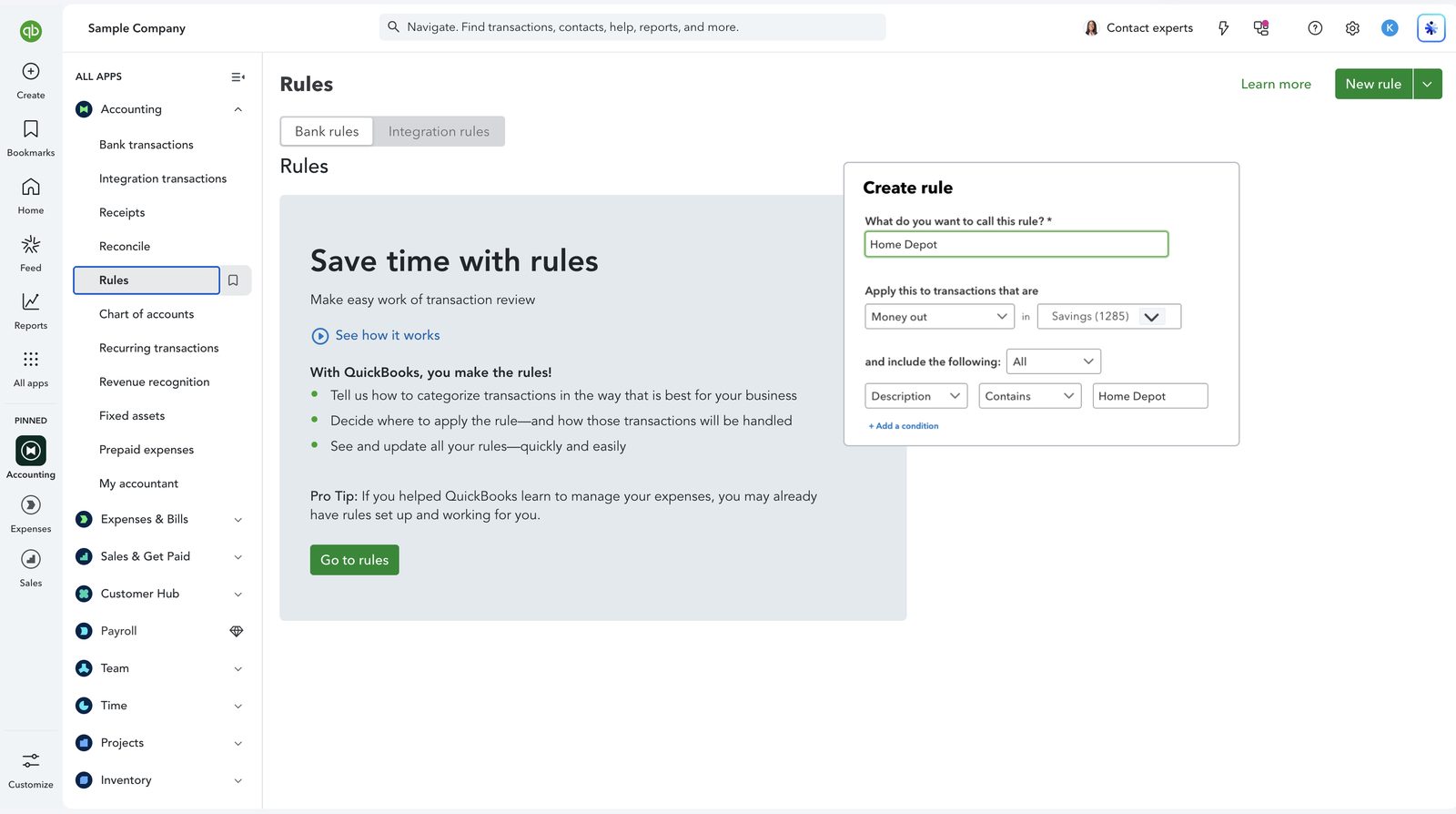
QuickBooks Online Create rule panel for transactions from Home Depot
Screenshot: the bank rules screen in QuickBooks Online, with a rule being set up for Home Depot transactions. Rules speed up recording, but a categorized line is not the same as an account that agrees with the bank statement. This is QuickBooks software, not a Logiframe product, shown on Intuit’s sample company, and the figures are illustrative. QuickBooks is a trademark of Intuit Inc.

The misconception

Why the Bank Feed Is Not Enough

Clearing For Review only proves that every line the feed delivered was dealt with.

It says nothing about lines the feed never delivered. Feeds disconnect, skip days and occasionally import the same transactions twice. The only check that catches this is agreeing the QuickBooks balance to the closing balance on the statement.

Weekly

Clear For Review

Lines matched or added, rules checked, questions raised while they are easy to answer.

Weekly

Check the feeds

Every connected account confirmed as still importing.

Month end

Reconcile

Each bank and card account agreed to its statement, with the report saved.

Ongoing

Resolve exceptions

Uncleared items investigated rather than carried forward.

Logiframe team members reviewing a file together at a laptop.

Diagnosis

Common Problems, and How Each Is Fixed

These are the issues we find most often when we take over a QuickBooks file.

SymptomUsual causeHow it is fixed
Beginning balance does not match the last statementA reconciled transaction was edited or deleted after the factFind the changed transaction in the reconciliation history and restore it, rather than forcing an adjustment
Duplicate transactionsA payment was entered by hand and then added again from the feedMatch the feed line to the existing entry instead of adding it, and delete the extra one
Balance in Undeposited Funds (Payments to deposit)Customer payments received but never grouped into a bank depositCreate deposits that match the actual bank deposits so cash and receivables are both right
Standing balance in Uncategorized or Ask My AccountantLines added without a known category and never revisitedWork through each with source documents and recode to zero
Transfers counted as income and expenseMoney moved between your own accounts was categorized on both sidesRecord it as a transfer so revenue and expenses are not overstated
Old uncleared itemsItems nobody could resolve, inherited by each new bookkeeperInvestigate, resolve what can be resolved, and clear the rest with documented approval

Each of these is quick to fix in the month it happens and slow a year later, because the evidence disappears. Monthly beats thorough-but-annual every time.

Credit cards

Credit Cards Need Their Own Attention

  • Reconcile to the statement period. Card cycles usually close mid-month. The card is reconciled to the issuer's statement, and the month-end liability is confirmed separately.
  • Card payments are transfers. The payment to the card issuer reduces the card liability. Coding it as an expense counts every purchase twice.
  • Pending versus posted. Amounts can change between authorization and posting, so matched lines are checked against what finally posted.
  • Receipts. Receipts are captured in QuickBooks and attached to the card line, so spend is supported when your CPA or an examiner asks.
  • Personal spend on business cards. Identified and coded to the right account instead of buried in expenses.
QuickBooks Online balance sheet with a balance in Undeposited Funds
Screenshot: a QuickBooks Online balance sheet. A balance like the one in Undeposited Funds here usually means payments were received but never matched to a bank deposit, which leaves cash and receivables both wrong. This is QuickBooks software, not a Logiframe product, shown on Intuit’s sample company, and the figures are illustrative. QuickBooks is a trademark of Intuit Inc.

Pricing

How It Is Priced

Reconciliation is part of every bookkeeping package, not a separate service.

PackagePriceWhat it covers
MonthlyFrom $399/monthEvery bank and card account reconciled, closed every month
WeeklyFrom $599/monthThe same work, done every week
Onboarding & Prior BookkeepingFrom $3,600 one-timeBringing a file current before the cycle starts

We reconcile accounts; we hold no payment authority and cannot move money. If the accounts have not agreed to a statement in months, the work starts with catch-up and clean-up.

Questions

QuickBooks Reconciliation, Answered

What is bank reconciliation in QuickBooks?
It is the process of agreeing the balance of a bank or card account in QuickBooks to the ending balance on the statement for the same date, ticking off each cleared transaction until the difference is zero. QuickBooks saves a reconciliation report for each statement.
Does an empty For Review tab mean my account is reconciled?
No. It means every transaction the bank feed delivered has been matched or added. Transactions the feed missed, and duplicates it created, only show up when the balance is agreed to the bank statement.
Why does my beginning balance not match my last statement?
Usually because a transaction that was already reconciled has since been edited, deleted or unmarked. The fix is to find and restore that change, not to post an adjustment that hides it.
How often should accounts be reconciled?
Bank lines should be reviewed at least weekly, and every bank and card account reconciled to its statement monthly. Problems are easy to fix in the month they happen and hard a year later.
Do you reconcile QuickBooks Desktop files?
Yes. The method is the same in Desktop Pro, Premier and Enterprise. Each account is agreed to the statement and the reconciliation report is kept.
How much does QuickBooks reconciliation cost?
It is included in our bookkeeping packages: monthly from $399/month and weekly from $599/month. Files that are behind start with onboarding and prior bookkeeping from $3,600 one-time.
QuickBooks ProAdvisor, Elite A team certified in QuickBooks Online, Intuit Enterprise Suite and Workforce.
Xero Gold Partner Certified advisors, with Xero as the platform our depth genuinely sits in.
13+ years in practice Across accounting outsourcing, ERP and accounting software work.

Not sure when your accounts last agreed?

Tell us which QuickBooks you are on and when the accounts were last reconciled.

Book a free 30-minute call See packages & pricing