
Monthly bookkeeping in QuickBooks

QuickBooks records the month. Someone still has to close it.

Bank feeds, rules and recurring transactions take care of much of the recording in QuickBooks. Proving the numbers is still human work: agreeing every account to a statement, tying receivables and payables to the ledger, and closing the books so the month stops moving. That is the work we do, in your QuickBooks file, every month or every week.

Definition

Recording, Then Proving

Monthly bookkeeping is two jobs, and QuickBooks automates one of them.

Recording is getting every transaction into the file with the right category: bills, invoices, receipts, payments, payroll. QuickBooks does much of this through bank feeds, bank rules, recurring transactions and receipt capture.

Proving is confirming that what was recorded matches reality: the bank agrees, the cards agree, the aging reports tie to the balance sheet and nothing sits in a holding account. Nothing in QuickBooks forces it to happen, so it is the half that gets skipped.

A month is done when you could ask why any figure on the profit and loss is what it is, and the file answers.

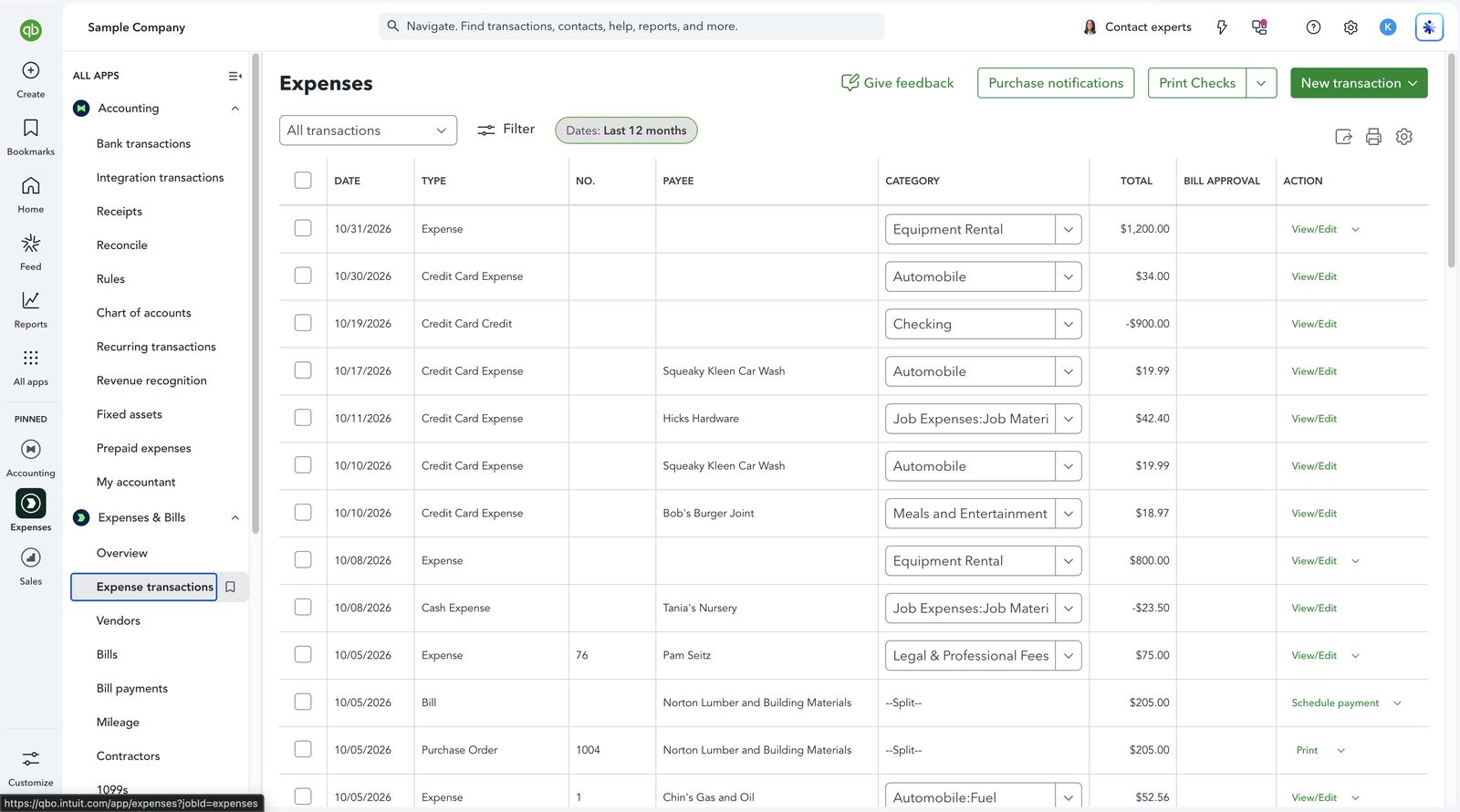
QuickBooks Online expense transactions list with a category on each line
Screenshot: the expense transactions list in QuickBooks Online. Recording means every line here carries the right payee and category, so the reports built from it can be trusted. This is QuickBooks software, not a Logiframe product, shown on Intuit’s sample company, and the figures are illustrative. QuickBooks is a trademark of Intuit Inc.

Cadence

The Shape of the Month

The work is spread across the month, with the first days of the next one reserved for closing.

Through the month

Keep up

Bank lines reviewed, bills and receipts entered as they arrive, questions asked while the answer is easy to get.

Mid-month

Clear the queue

For Review tab cleared, feeds confirmed live, invoicing and bill payments on schedule.

Month end

Agree

Every account reconciled to its statement, accruals posted, aging reports tied to the ledger.

Close

Report and lock

Reports reviewed for sense, variances explained, and a closing date set.

Weekly bookkeeping runs the same cycle every week, for businesses where cash moves fast enough that a month is too long to wait.

A Logiframe bookkeeper working at a laptop, with colleagues talking in the background.

The list

The Monthly Checklist

Payroll, inventory and sales tax apply selectively. The rest applies to almost every business on QuickBooks.

TaskWhy it matters
Clear the For Review tab for every connected accountUnreviewed lines leave every report short
Reconcile each bank and card account to its statementThe only check that catches what the feed never delivered
Match bank lines to existing bills and invoicesAdding them again doubles the expense and leaves the bill open
Empty Undeposited Funds into deposits that match the bankPayments parked there make cash and receivables both wrong
Clear Uncategorized and Ask My Accountant to zeroA standing balance means unexplained transactions became permanent
Tie receivables and payables aging to the balance sheetDifferences point to unapplied payments or misposted entries
Agree payroll liabilities to the payroll reportsLiabilities that drift hide unpaid or double-paid taxes
Reconcile sales tax payable to the returns filedThe balance sheet figure should match what is owed
Post accruals, prepayments and depreciationExpenses belong in the month they relate to
Review the profit and loss against prior monthsAn unexplained swing is usually a coding error
Set the closing dateStops edits to a month that has been reported
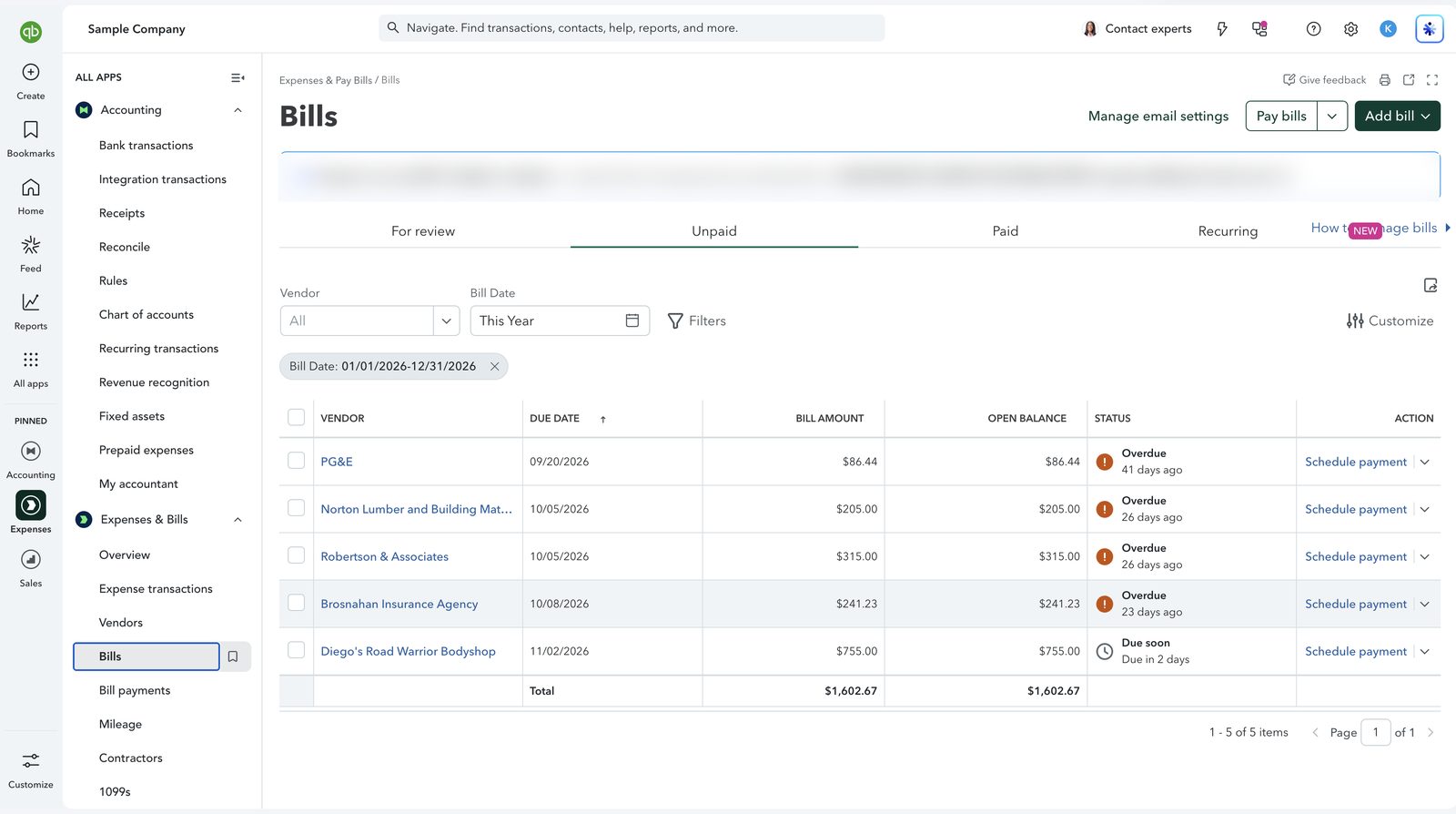
QuickBooks Online unpaid bills with overdue status and a total
Screenshot: unpaid bills in QuickBooks Online, with due dates, open balances and overdue status. Bank payments are matched to these bills rather than entered again as new expenses. This is QuickBooks software, not a Logiframe product, shown on Intuit’s sample company, and the figures are illustrative. QuickBooks is a trademark of Intuit Inc.

Features

QuickBooks Features That Carry the Cycle

  • Bank rules. Categorize recurring transactions as they arrive. Written narrowly, they save hours. Written broadly, they miscode silently, so we review what each rule touched every month.
  • Recurring transactions. Scheduled invoices, bills and journal entries, so predictable items never depend on someone remembering them.
  • Receipt capture. Receipts photographed or emailed in and matched to bank lines, so documents sit with the transactions they support.
  • Classes and locations. Reporting by department, location or service line without multiplying the chart of accounts.
  • Close the books. A closing date, with a password, so changes to a reported month need deliberate approval.
  • Audit log. Who changed what, and when, so a number that moves after close can be traced.
QuickBooks Online recurring transactions list with monthly scheduled entries
Screenshot: recurring transactions in QuickBooks Online. Predictable entries such as rent and phone bills are scheduled to post every month. This is QuickBooks software, not a Logiframe product, shown on Intuit’s sample company, and the figures are illustrative. QuickBooks is a trademark of Intuit Inc.

Pricing

Packages and Pricing

The same published pricing as our Xero packages.

PackagePriceWhat it covers
MonthlyFrom $399/monthThe full cycle above, closed every month
WeeklyFrom $599/monthThe same cycle, worked every week
AR and AP managementFrom $100/month eachCollections and supplier payments, as add-ons
Onboarding & Prior BookkeepingFrom $3,600 one-timeBringing a file current before the cycle starts

If the file is behind, the work starts with catch-up and clean-up. What each package includes is set out on the bookkeeping packages and pricing page.

Questions

Monthly Bookkeeping in QuickBooks, Answered

What does monthly bookkeeping in QuickBooks include?
Clearing the For Review tab, reconciling every bank and card account to its statement, matching payments to bills and invoices, emptying Undeposited Funds, tying receivables and payables to the balance sheet, agreeing payroll liabilities and sales tax, posting accruals, reviewing the reports and setting a closing date.
How much does QuickBooks bookkeeping cost?
Monthly bookkeeping starts from $399/month and weekly from $599/month. AR and AP management are add-ons from $100/month each. These are the same published prices as our Xero packages.
Do you work in our existing QuickBooks file?
Yes. You invite us as your accounting firm and we work in your file. Your subscription stays in your name and your billing does not change.
Do you do monthly bookkeeping in QuickBooks Desktop?
Yes, in Pro, Premier and Enterprise files. The monthly cycle is the same. If your Desktop release is approaching its service discontinuation date, we will flag it and plan a move with you.
What does closing the books in QuickBooks do?
It sets a closing date, optionally with a password, so changes to transactions on or before that date need deliberate approval. It keeps a reported month from changing after the fact.
Who is the monthly service for?
Businesses already on QuickBooks that want the month closed properly without hiring an in-house bookkeeper. Our team is certified in QuickBooks Online at Level 1 and Level 2, and the firm holds Elite tier in the QuickBooks ProAdvisor program.
QuickBooks ProAdvisor, Elite A team certified in QuickBooks Online, Intuit Enterprise Suite and Workforce.
Xero Gold Partner Certified advisors, with Xero as the platform our depth genuinely sits in.
13+ years in practice Across accounting outsourcing, ERP and accounting software work.

Ready to hand over the month?

Tell us which QuickBooks you are on and how current the books are.

Book a free 30-minute call See packages & pricing
Thank you! Your submission has been received!
Oops! Something went wrong while submitting the form.