QuickBooks catch-up & clean-up

Months behind in QuickBooks? We bring the file current, then keep it there.

A QuickBooks file that has fallen behind rarely needs starting over. It needs the missing months entered, the wrong ones corrected and every account agreed back to a statement, in an order that avoids doing the work twice. Our team is certified in QuickBooks Online at Level 1 and Level 2, and we work in Desktop files too.

Definitions

Two Jobs That Arrive Together

Most files that are behind need both, and they call for different work.

Catch-up

The problem is absence. Bank lines sit in the For Review tab, bills were never entered and invoices were never raised.

The work is volume: get the transactions in, categorize them and reconcile them. Bank rules and batch actions do most of the lifting here.

Clean-up

The problem is error. Transactions are in the file but wrong: duplicates, transfers booked as income, Uncategorized Expense holding a year of unknowns, and Opening Balance Equity carrying a figure nobody can explain.

The work is diagnosis first, then correction.

Catch up first, then clean up. Missing months change what the existing entries mean, so diagnosing an incomplete file means diagnosing it twice. The exception is a chart of accounts so broken that coding anything into it creates more work later. That gets fixed first.

Logiframe accountants reviewing a file together at their laptops.

First

Diagnosis Before Anything Moves

An hour of diagnosis decides whether the rest takes days or weeks.

Find the last date the file was right

We compare each month-end bank balance with what QuickBooks shows for that date, working backwards. The most recent month where they agree is the starting line. Everything after it is in scope, and nothing before it gets reopened without a reason.

Read the balance sheet for warning signs

Balances in Uncategorized Income, Uncategorized Expense or Uncategorized Asset. A figure in Opening Balance Equity long after setup. Ask My Accountant with anything in it. Aged receivables and payables that do not tie to their control accounts. Undeposited Funds holding payments from months ago. Each one points to a specific kind of error.

QuickBooks Online balance sheet with a balance in Undeposited Funds
Screenshot: a QuickBooks Online balance sheet. A balance like the one in Undeposited Funds here is one of the first things we check, because payments parked there leave both cash and receivables wrong. This is QuickBooks software, not a Logiframe product, shown on Intuit’s sample company, and the figures are illustrative. QuickBooks is a trademark of Intuit Inc.

Check what was changed by hand

The audit log in QuickBooks Online shows who changed what, and when. Reconciliations that were undone, transactions deleted after a period was reported, and entries forced to clear are the changes most likely to make a file look reconciled when it is not.

Confirm how far the bank feed reaches

A bank connection imports a limited window of history, and a feed that dropped out does not refill the gap on its own. Where it falls short, statement files from the bank fill the missing period.

Tools

The QuickBooks Tools That Do the Bulk Work

Several of the fastest tools sit in the accountant view, which is one reason businesses catching up on their own rarely find them.

ProblemQuickBooks toolWhere it sits
Hundreds of bank lines waiting in For ReviewBank rules first, then batch actions to categorize and accept in groupsEvery QuickBooks Online plan
Feed does not reach back far enoughUpload statement files from the bankEvery QuickBooks Online plan
Transactions posted to the wrong accountReclassify transactionsAccountant tools
A reconciliation that was done wronglyUndo reconciliation, then reconcile againAccountant tools
Duplicate accounts, vendors or customersMerge the records into the one you keepChart of accounts and lists
Payments stuck in Undeposited FundsGroup them into bank deposits that match the statementEvery QuickBooks Online plan
Opening balances wrong from the startJournal entries against Opening Balance Equity, documentedEvery QuickBooks Online plan
Unclear what was changed by handAudit logEvery QuickBooks Online plan
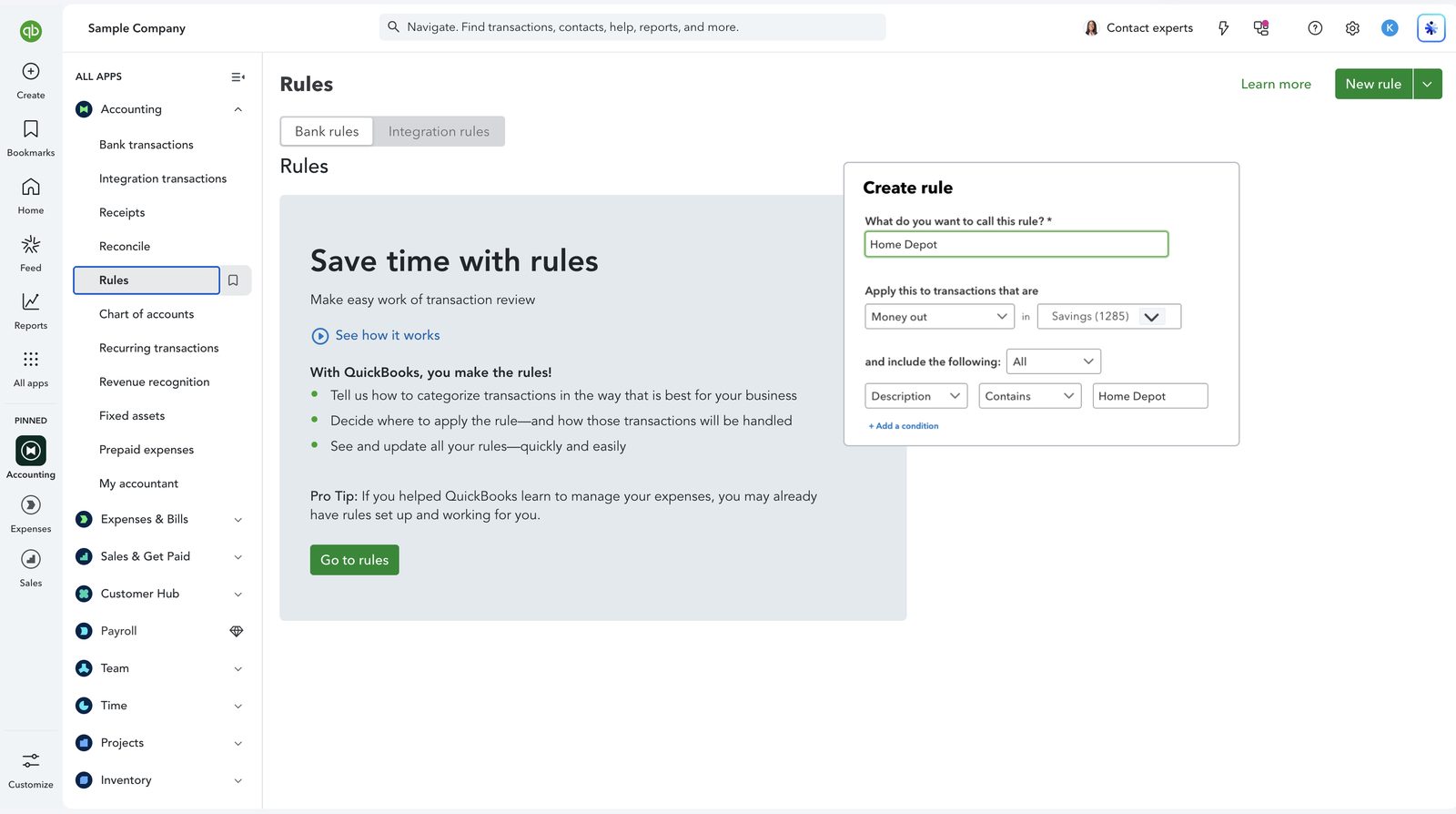
QuickBooks Online Create rule panel for transactions from Home Depot
Screenshot: the bank rules screen in QuickBooks Online, with a rule being set up for Home Depot transactions. A rule like this categorizes every matching bank line, which is how we clear hundreds of lines in For Review. This is QuickBooks software, not a Logiframe product, shown on Intuit’s sample company, and the figures are illustrative. QuickBooks is a trademark of Intuit Inc.

Desktop files have their own toolkit, and the Accountant edition adds client data review tools for the same jobs. The order of the work below is the same on either.

Order of operations

The Order That Avoids Rework

Clean-ups go wrong through sequence more than technique.

Step 1

Set the starting line

The last month where every bank balance agrees. Nothing earlier is reopened without cause.

Step 2

Fix the structure

Chart of accounts, classes and locations corrected before thousands of lines are coded into them.

Step 3

Complete the data

Missing statements uploaded, bills and invoices entered, bank rules written, the For Review queue cleared.

Step 4

Correct and close

Errors reclassified, holding accounts cleared to zero, every account reconciled, and the books closed with a closing date.

QuickBooks Online chart of accounts with account types and balances
Screenshot: the chart of accounts in QuickBooks Online, with each account’s type, detail type and balance. Step 2 corrects this list before any transactions are recoded. This is QuickBooks software, not a Logiframe product, shown on Intuit’s sample company, and the figures are illustrative. QuickBooks is a trademark of Intuit Inc.

Four habits that make a file worse

Adding a bank line as a new expense when it pays a bill that is already entered, so the cost lands twice and the bill stays open. Forcing a reconciliation to balance with an adjustment. Uploading a statement file that overlaps the feed, which creates duplicates that look legitimate. And finishing without a closing date, which leaves every corrected month open to edits.

Completion

What Finished Looks Like

A clean-up is done when the file can answer questions, not when the For Review tab is empty.

  • Every bank and card account agrees to its statement at each month end in the period we worked.
  • Uncategorized, suspense and Ask My Accountant accounts are at zero, and Opening Balance Equity is explained.
  • Receivables and payables aging reports tie to their balance sheet accounts.
  • Undeposited Funds holds only payments received in the last few days.
  • Write-offs are documented, with the reason and who approved them.
  • The books are closed with a closing date, so the corrected months stay corrected.

Then the monthly cycle starts. Files fall behind because nobody owned the routine, so a clean-up that ends without one only buys a few months. Ours move straight into monthly bookkeeping in QuickBooks.

Pricing

What It Costs

Catch-up and clean-up is priced as Onboarding & Prior Bookkeeping, from $3,600 one-time.

The figure depends on how many months are in scope, how many accounts need reconciling and how much of the work is correction rather than entry. We size it on the first call from a look at your balance sheet and bank statements, and the monthly package that follows starts from $399/month. The same pricing applies to Xero and QuickBooks, and the full breakdown is on the bookkeeping packages and pricing page.

Questions

QuickBooks Catch-Up, Answered

How do I catch up months of bookkeeping in QuickBooks Online?
Find the last month where your QuickBooks balances agreed to your bank statements, and start from there. Upload statement files for any period the bank feed does not cover, write bank rules for recurring transactions, then work through the For Review tab using batch actions. Match bank lines to bills and invoices already entered rather than adding them again. Finish by reconciling every account to its statement and setting a closing date.
Should I catch up first or clean up first?
Catch up first. Missing months change what the existing entries mean, so cleaning an incomplete file means diagnosing it twice. The exception is a chart of accounts so broken that coding into it creates more work, which gets fixed before anything else.
What does a balance in Uncategorized Expense or Opening Balance Equity mean?
Uncategorized Expense holds bank transactions that were accepted without a category. Opening Balance Equity is where QuickBooks posts starting balances, and it should be cleared once setup is complete. A balance in either long after setup means transactions or opening figures were never resolved, and each item needs tracing to its source.
Can you fix transactions coded to the wrong account in bulk?
Yes. The Reclassify transactions tool in the accountant view changes the account on many transactions at once. We diagnose first, because recoding before the data is complete moves errors somewhere less visible.
Do you do catch-up work in QuickBooks Desktop?
Yes, in Pro, Premier and Enterprise files. The sequence is the same as in QuickBooks Online. If you plan to move to QuickBooks Online, we usually clean the file before converting it, so the errors do not travel with the data.
How long does a QuickBooks catch-up take?
It depends more on how easily statements and source documents can be gathered than on transaction volume. With statements to hand and someone available to answer questions, twelve months for a small business is typically a matter of weeks. We give you a timetable after the diagnosis.
How much does QuickBooks catch-up and clean-up cost?
It is priced as Onboarding & Prior Bookkeeping, from $3,600 one-time, sized by the number of months and accounts in scope. Monthly bookkeeping afterwards starts from $399/month, the same pricing we publish for Xero.
QuickBooks ProAdvisor, Elite A team certified in QuickBooks Online, Intuit Enterprise Suite and Workforce.
Xero Gold Partner Certified advisors, with Xero as the platform our depth genuinely sits in.
13+ years in practice Across accounting outsourcing, ERP and accounting software work.

Tell us how far behind the books are.

Which QuickBooks you are on and the last month you trust. We will tell you what it takes to get current.

Book a free 30-minute call See packages & pricing
Thank you! Your submission has been received!
Oops! Something went wrong while submitting the form.